Tag: Cisco

  • Introduction To Cisco ASA Firewall

    Introduction

    • In computer networking, Cisco ASA 5500 Series Adaptive Security Appliances, or simply Cisco ASA, is Cisco’s line of network security devices introduced in May 2005, that succeeded three existing lines of popular Cisco products:
    • Cisco PIX, which provided firewall and network address translation (NAT) functions ended sale on 28 July 2008.
    • Cisco IPS 4200 Series, which worked as intrusion prevention systems (IPS).
    • Cisco VPN 3000 Series Concentrators, which provided virtual private networking (VPN).
    • The Cisco ASA is a unified threat management device, combining several network security functions in one box.

    Cisco ASA Features

    • antivirus
    • antispam
    • IDS/IPS engine
    • VPN Device
    • SSL Device
    • content inspection

    ASA Models and their throughputs

    • Cisco ASA 5505
    • Cisco ASA 5510
    • Cisco ASA 5520
    • Cisco ASA 5525-X
    • Cisco ASA 5540
    • Cisco ASA 5550
    • Cisco ASA 5580-20
    • Cisco ASA 5580-40
    Model5506-X5506W-X5506H-X5508-X5512-X5515-X5516-X5525-X5545-X5555-X5585-X
    Throughput Gb/s0.250.250.250.450.30.50.851.11.51.754-40
    GB ports88486688886-8
    Ten GB ports00000000002-4
    Form factordesktopdesktopdesktop1 RU1 RU1 RU1 RU1RU1RU1RU2RU


    ASA Architecture

    • ASA is an application-aware stateful packet filtering firewall
    • Inspects all the packets which are passing through the firewall
    • Each and every interface on ASA requires configuration of following parameters

    ASA Architecture

    • ASA is an application-aware stateful packet filtering firewall
    • Inspects all the packets which are passing through the firewall
    • Each and every interface on ASA requires configuration of following parameters

    1.Interfaces with name and IP Address Add block

    2.Security Level

    ASA security levels

    • By default ,the security level is automatically set to the interface once name is configured §ASA uses security level 100 for trusted or internal networks and 0 for un-trusted or public networks
    • We can configure security levels to other interfaces also like DMZ 50
    • By default, traffic from higher traffic level to lower are allowed or inspected, all other traffic is blocked
    This image has an empty alt attribute; its file name is image.png
  • Introduction to Firewall

    WHAT IS FIREWALL

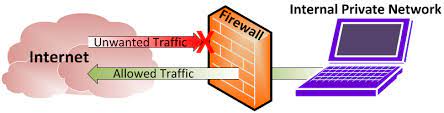
    A firewall is a network security device, either hardware or software-based, which monitors all incoming and outgoing traffic and based on a defined set of security rules it accepts, rejects or drops that specific traffic.

    Accept : allow the traffic

    Reject : block the traffic but reply with an “unreachable error”

    Drop : block the traffic with no reply

    A firewall establishes a barrier between secured internal networks and outside untrusted network, such as the Internet.

    HISTORY AND NEED FOR FIREWALL

    Before Firewalls, network security was performed by Access Control Lists (ACLs) residing on routers. ACLs are rules that determine whether network access should be granted or denied to specific IP address.

    But ACLs cannot determine the nature of the packet it is blocking. Also, ACL alone does not have the capacity to keep threats out of the network. Hence, the Firewall was introduced.

    TYPES OF FIREWALL

    There are two types of firewalls: software and hardware.

    Hardware firewalls are built into network devices such as routers and can protect every single machine on a network and require little configuration to work effectively. They use packet filtering techniques to examine the header of a packet, determining his source and destination and then, comparing the data to a set of predefined rules, they decide whether to drop the packet or forward it to the next step or to its destination.

    Software firewalls are the most popular network protection method for home users. They usually come as stand-alone applications or as part of a complete anti virus protection software, such as Kaspersky, AVG etc. Besides providing protection for inbound and outbound traffic, a software firewall can also protect against Trojan or Worm applications and allows various options of control over its functions and features.

    GENERATION OF FIREWALL

    First Generation- Packet Filtering Firewall : Packet filtering firewall is used to control network access by monitoring outgoing and incoming packet and allowing them to pass or stop based on source and destination IP address, protocols and ports. It analyses traffic at the transport protocol layer (but mainly uses first 3 layers).

    Packet firewalls treat each packet in isolation. They have no ability to tell whether a packet is part of an existing stream of traffic. Only It can allow or deny the packets based on unique packet headers.

    Second Generation- Stateful Inspection Firewall : Stateful firewalls (performs Stateful Packet Inspection) are able to determine the connection state of packet, unlike Packet filtering firewall, which makes it more efficient. It keeps track of the state of networks connection travelling across it, such as TCP streams. So the filtering decisions would not only be based on defined rules, but also on packet’s history in the state table.

    Third Generation- Application Layer Firewall : Application layer firewall can inspect and filter the packets on any OSI layer, up to the application layer. It has the ability to block specific content, also recognize when certain application and protocols (like HTTP, FTP) are being misused.

    In other words, Application layer firewalls are hosts that run proxy servers. A proxy firewall prevents the direct connection between either side of the firewall, each packet has to pass through the proxy. It can allow or block the traffic based on predefined rules.Note: Application layer firewalls can also be used as Network Address Translator(NAT).

    Next Generation Firewalls (NGFW) : Next Generation Firewalls are being deployed these days to stop modern security breaches like advance malware attacks and application-layer attacks. NGFW consists of Deep Packet Inspection, Application Inspection, SSL/SSH inspection and many functionalities to protect the network from these modern threats.

    TOP 5 NEXT GENERATION FIREWALL VENDORS

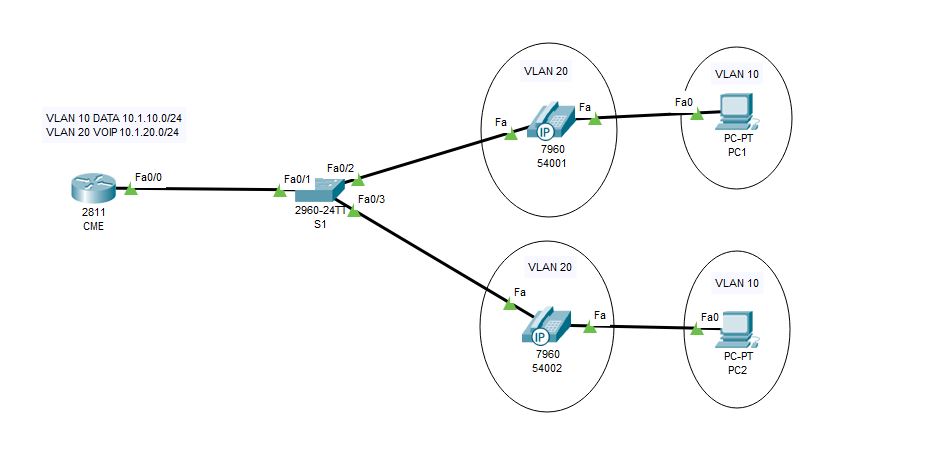
  • Basic VoIP Configuration in Cisco Packet Tracer 7.2

    Here i am going to explain how to setup a small VoIP lab in latest packet tracer.

    Network Topology

    VOIP1.JPG

    Configurations

    1.DHCP & Interface configurations in C2811

    !
    hostname CME
    !
    ip dhcp pool DATA
    network 10.1.10.0 255.255.255.0
    default-router 10.1.10.254
    ip dhcp pool VOIP
    network 10.1.20.0 255.255.255.0
    default-router 10.1.20.254
    option 150 ip 10.1.20.254
    !
    interface FastEthernet0/0
    no ip address
    duplex auto
    speed auto
    !
    interface FastEthernet0/0.10
    encapsulation dot1Q 10
    ip address 10.1.10.254 255.255.255.0
    !
    interface FastEthernet0/0.20
    encapsulation dot1Q 20
    ip address 10.1.20.254 255.255.255.0
    !
    end

    2.CME Telephony configuration in C2811

    CME(config)#telephony-service             #telephony service
    CME(config-telephony)#max-ephones 5 #maximum number of phones
    CME(config-telephony)#max-dn 5        #maximum number of telephony numbers
    CME(config-telephony)#ip source-address 10.1.20.254 port 2000  #source IP address
    CME(config-telephony)#auto assign 4 to 6  #ext numbers to buttons
    CME(config-telephony)#auto assign 1 to 5  #ext numbers to buttons

    3.Phone directory for phones

    CME(config)#ephone-dn 1       #directory entry
    CME(config-ephone-dn)#number 54001                #phone number to this entry
    !
    CME(config)#ephone-dn 2         #directory entry
    CME(config-ephone-dn)#number 54002                #phone number to this entry

    4.Voice VLAN configuration 

    hostname S1
    !
    vlan 10
    name DATA
    vlan 20
    name VOIP

    !

    interface FastEthernet0/1
    switchport mode trunk
    !
    interface FastEthernet0/2
    switchport access vlan 10
    switchport mode access
    switchport voice vlan 20
    spanning-tree portfast
    !
    interface FastEthernet0/3
    switchport access vlan 10
    switchport mode access
    switchport voice vlan 20
    spanning-tree portfast
    !

    Verification

    Try to call from one phone to another 🙂 🙂 If you have any doubt please reach out to me


  • Traffic Engineering in EIGRP using Delay

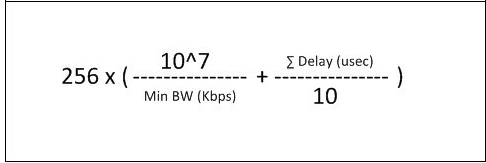
    Here i am going to explain how to change paths using delay in EIGRP, We already know that EIGRP uses Bandwidth and Delay for metric calculation but we cant change bandwidth of links in production network . The path with lesser delay will be the desired path.

    EIGRP-Composite-Metric-Formula

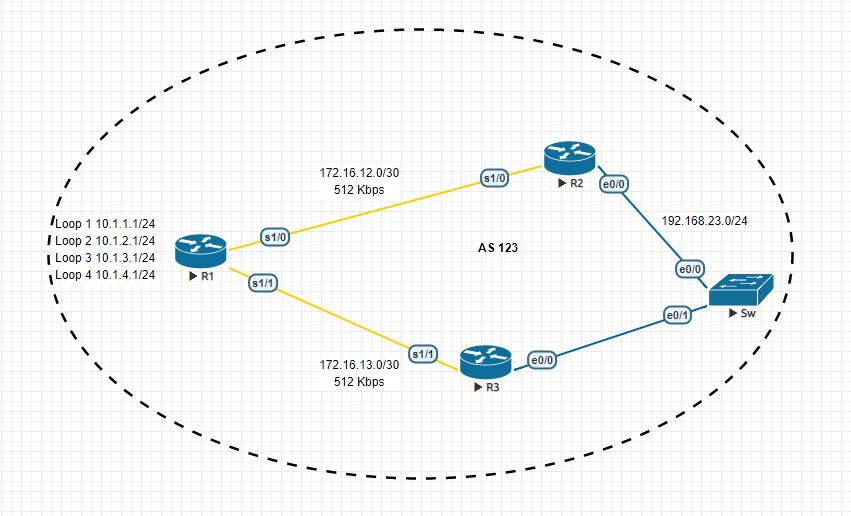
    EIGRP_1


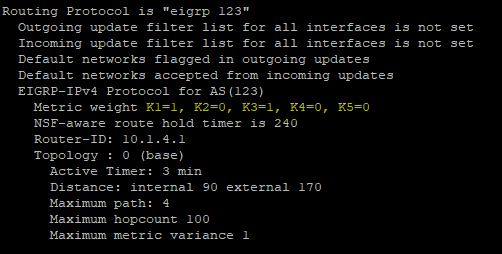
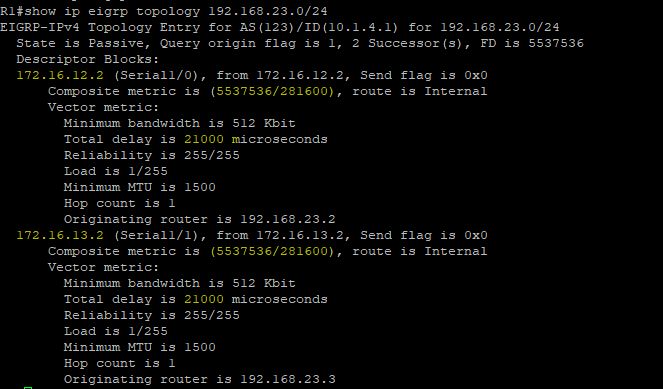
    In the above topology there are two paths to reach 192.168.23.0/24 network from R1  and right now R1 uses both links for load balancing because both having same metric.But i want to use only path to reach that destination and i going to do that with the help of delay.

    EIGRP_delayEIGRP_delay_1EIGRP_delay_2

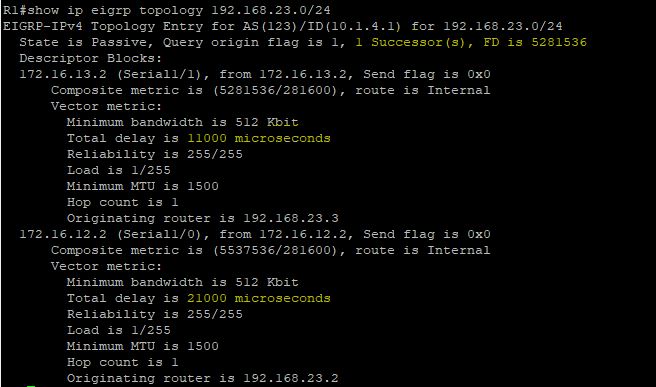
    I am going to decrease  the delay in R1->R3 by that metric will also decrease and R1 prefer that path to reach 192.168.23.0/24.

    R1

    interface Serial1/1
    bandwidth 512
    ip address 172.16.13.1 255.255.255.252
    delay 1000
    serial restart-delay 0
    end

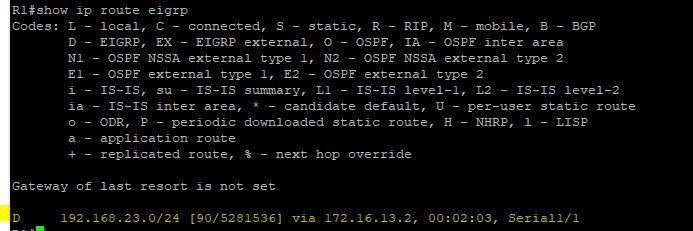
    EIGRP_delay_3EIGRP_delay_4

    Now there is only one path to reach that network 🙂

  • Update Tuning in RIPv2

    In RIPv2 we can tune its updates there are so many ways , Lets see some of them

    Default

    RIPv2 Broadcast updates

    Normally RIPv2 uses 224.0.0.9 as the multicast address but we can change it to global broadcast address.

    debug ip rip of R1 is given below

    *Sep 25 14:38:38.069: RIP: sending v2 update to 224.0.0.9 via Serial1/1 (172.16.14.1)
    *Sep 25 14:38:38.069: RIP: build update entries
    *Sep 25 14:38:38.069: 10.2.2.0/24 via 0.0.0.0, metric 2, tag 0
    *Sep 25 14:38:38.069: 172.16.12.0/30 via 0.0.0.0, metric 1, tag 0
    *Sep 25 14:38:38.069: 172.16.23.0/30 via 0.0.0.0, metric 2, tag 0

    I am going to change this
    interface Serial1/1
    ip rip v2-broadcast

    Now RIPv2 is using 255.255.255.255 for its updates
    *Sep 25 15:21:33.899: RIP: sending v2 update to 255.255.255.255 via Serial1/1 (172.16.14.1)
    *Sep 25 15:21:33.899: RIP: build update entries
    *Sep 25 15:21:33.899: 10.2.2.0/24 via 0.0.0.0, metric 2, tag 0
    *Sep 25 15:21:33.899: 172.16.12.0/30 via 0.0.0.0, metric 1, tag 0
    *Sep 25 15:21:33.899: 172.16.23.0/30 via 0.0.0.0, metric 2, tag 0

    RIPv2 Unicast Updates

    To change to uni cast updates follow these mentioned commands
    router rip
    version 2
    passive-interface Serial1/0
    passive-interface Serial1/1
    network 172.16.0.0
    neighbor 172.16.12.1
    neighbor 172.16.23.1
    no auto-summary

    Now RIP is sending updates to those neighbors only
    *Sep 25 15:26:54.423: RIP: sending v2 update to 172.16.12.1 via Serial1/0 (172.16.12.1)
    *Sep 25 15:26:54.423: RIP: build update entries
    *Sep 25 15:26:54.423: 10.4.4.0/24 via 0.0.0.0, metric 2, tag 0
    *Sep 25 15:26:54.423: 172.16.14.0/30 via 0.0.0.0, metric 1, tag 0
    *Sep 25 15:26:54.423: 172.16.34.0/30 via 0.0.0.0, metric 2, tag 0
    *Sep 25 15:26:54.423: RIP: sending v2 update to 172.16.23.1 via Serial1/0 (172.16.12.1)
    *Sep 25 15:26:54.423: RIP: build update entries
    *Sep 25 15:26:54.423: 10.4.4.0/24 via 0.0.0.0, metric 2, tag 0
    *Sep 25 15:26:54.423: 172.16.14.0/30 via 0.0.0.0, metric 1, tag 0
    *Sep 25 15:26:54.423: 172.16.34.0/30 via 0.0.0.0, metric 2, tag 0
    R1#
    *Sep 25 15:26:54.434: RIP: ignored v2 packet from 172.16.12.1 (sourced from one of our addresses)
    *Sep 25 15:26:54.738: RIP: received v2 update from 172.16.14.2 on Serial1/1
    *Sep 25 15:26:54.738: 10.4.4.0/24 via 0.0.0.0 in 1 hops
    *Sep 25 15:26:54.738: 172.16.23.0/30 via 0.0.0.0 in 2 hops
    *Sep 25 15:26:54.738: 172.16.34.0/30 via 0.0.0.0 in 1 hops


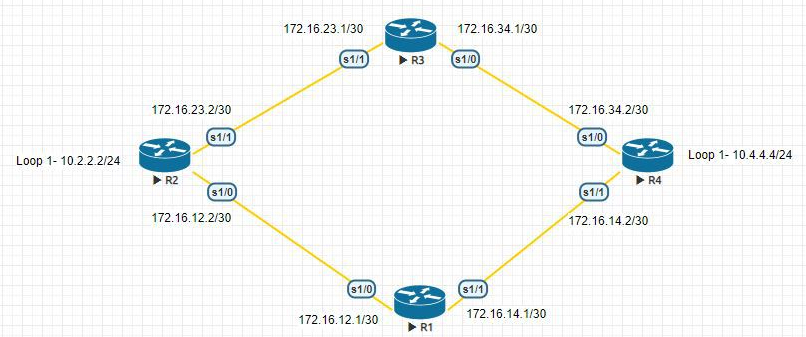
  • Route Manipulation in RIPv2 using AD Value

    In this article i am going to explain how to manipulate route with AD value in RIP. For this i am using the same old topology.

    Default
    10.0.0.0/8 is variably subnetted, 3 subnets, 2 masks
    R 10.4.4.0/24 [120/2] via 172.16.23.1, 00:00:19, Serial1/1
                            [120/2] via 172.16.12.1, 00:00:27, Serial1/0
    172.16.0.0/16 is variably subnetted, 6 subnets, 2 masks
    R 172.16.14.0/30 [120/1] via 172.16.12.1, 00:00:27, Serial1/0
    R 172.16.34.0/30 [120/1] via 172.16.23.1, 00:00:19, Serial1/1

    In here i want use R2 to reach 10.4.4.0/24 network for that i am going to use AD value manipulation.

    !
    access-list 1 permit 10.4.4.0
    !
    router rip
    version 2
    network 10.0.0.0
    network 172.16.0.0
    distance 255 172.16.23.1 0.0.0.0 1
    no auto-summary

    If you verify the routing table after this you can see only path .

    10.0.0.0/8 is variably subnetted, 3 subnets, 2 masks
    R 10.4.4.0/24 [120/2] via 172.16.12.1, 00:00:07, Serial1/0
    172.16.0.0/16 is variably subnetted, 6 subnets, 2 masks
    R 172.16.14.0/30 [120/1] via 172.16.12.1, 00:00:07, Serial1/0
    R 172.16.34.0/30 [120/1] via 172.16.23.1, 00:00:07, Serial1/1

  • Route manipulation in RIPv2 using Offset-List

    Default

    In this topology we are using RIPv2 and R2 is getting route information about 10.4.4.0/24 from R3 and R1. But i don’t want to install two routes in the table. I want to use R3 to reach that network for that  i am using Offset-List.

    Lets check the present routing table of R2

    10.0.0.0/8 is variably subnetted, 3 subnets, 2 masks
    R 10.4.4.0/24 [120/2] via 172.16.23.1, 00:00:20, Serial1/1
                            [120/2] via 172.16.12.1, 00:00:28, Serial1/0
    172.16.0.0/16 is variably subnetted, 6 subnets, 2 masks
    R 172.16.14.0/30 [120/1] via 172.16.12.1, 00:00:28, Serial1/0
    R 172.16.34.0/30 [120/1] via 172.16.23.1, 00:00:20, Serial1/1

    R2#show ip route 10.4.4.0
    Routing entry for 10.4.4.0/24
    Known via “rip”, distance 120, metric 2
    Redistributing via rip
    Last update from 172.16.12.1 on Serial1/0, 00:00:00 ago
    Routing Descriptor Blocks:
    * 172.16.23.1, from 172.16.23.1, 00:00:20 ago, via Serial1/1
    Route metric is 2, traffic share count is 1
    172.16.12.1, from 172.16.12.1, 00:00:00 ago, via Serial1/0
    Route metric is 2, traffic share count is 1

    Offset-List Configuration
    !
    access-list 1 permit 10.4.4.0
    !
    router rip
    version 2
    offset-list 1 in 14 Serial1/0
    network 10.0.0.0
    network 172.16.0.0
    no auto-summary
    !

    Now we can see that only one route is present in routing table

    10.0.0.0/8 is variably subnetted, 3 subnets, 2 masks
    R 10.4.4.0/24 [120/2] via 172.16.23.1, 00:00:07, Serial1/1
    172.16.0.0/16 is variably subnetted, 6 subnets, 2 masks
    R 172.16.14.0/30 [120/1] via 172.16.12.1, 00:00:09, Serial1/0
    R 172.16.34.0/30 [120/1] via 172.16.23.1, 00:00:07, Serial1/1

    If we debug RIP updates we can see that one route is inaccessible because of maximum hop count rule in RIP.

    *Sep 21 18:06:49.248: RIP: received v2 update from 172.16.12.1 on Serial1/0
    *Sep 21 18:06:49.248: 10.4.4.0/24 via 0.0.0.0 in 16 hops (inaccessible)
    *Sep 21 18:06:49.248: 172.16.14.0/30 via 0.0.0.0 in 1 hops
    *Sep 21 18:06:49.248: 172.16.34.0/30 via 0.0.0.0 in 2 hops

  • Why did it choose this path ?

    Lets check path selection in routing ,

    Find the longest match:- We want to go to 1.2.3.4 and in the routing table there are three entries like

    1.0.0.0/8 is variably subnetted, 3 subnets, 3 masks
    S 1.0.0.0/8 [1/0] via 172.16.12.1
    S 1.2.0.0/16 [1/0] via 172.16.12.2
    S 1.2.3.0/24 [1/0] via 172.16.12.3

    Then it will choose 1.2.3.0/24 because it is more accurate than the other routes.

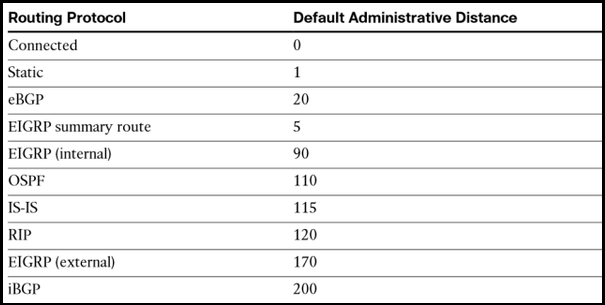
    If there are multiple longest matches then it will check whether they are coming from different protocols or same protocols. If they are coming from different protocols then it will check the AD value of each routes and will choose the path which has lowest AD value.

    IP-Routing-Cisco


    If they are coming from same protocols then it will check the metric and will choose the path which has lowest metric.


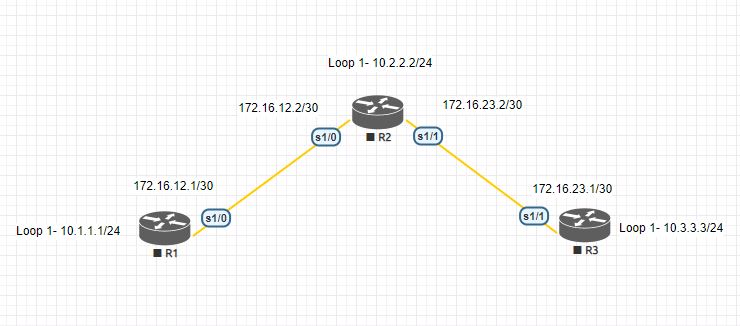
  • What is permanent key word in Static Routing ?

    What is permanent key word in Static Routing ?

    In the Static routing there is one key word permanent is there, lets check the significance of that.

    If the exit interface is Down then the route will also removed from the table so in some cases we want to keep the routes in the table even if the exit interface is down. For that we are using Permanent key word , lets check it in our lab
    10.0.0.0/8 is variably subnetted, 4 subnets, 2 masks
    S 10.2.2.0/24 [1/0] via 172.16.12.2
    S 10.3.3.0/24 is directly connected, Serial1/0
    172.16.0.0/16 is variably subnetted, 3 subnets, 2 masks
    S 172.16.23.0/30 [1/0] via 172.16.12.2

    here all those Static routes are present and i am going to shutdown the S1/0 interface

    R1(config-if)#
    *Sep 19 15:59:48.137: %LINK-5-CHANGED: Interface Serial1/0, changed state to administratively down
    *Sep 19 15:59:49.143: %LINEPROTO-5-UPDOWN: Line protocol on Interface Serial1/0, changed state to down

    R1#show ip route static

    Gateway of last resort is not set

    R1#

    See nothing is there

    Now i am going to add permanent keyword with one Static route
    R1(config)#ip route 10.3.3.0 255.255.255.0 s1/0 permanent

    R1#show ip route static

    Gateway of last resort is not set

    10.0.0.0/8 is variably subnetted, 3 subnets, 2 masks
    S 10.3.3.0/24 is directly connected, Serial1/0

    See that route is present and rest of all are gone.

  • Static Routing in Cisco Router

    Static1Routing is the process of selecting paths for networks. We can use either Static or Dynamic method for this, in static routing the administrator itself assigning paths for each unknown networks but in the case of dynamic protocols are building paths for those unknown networks. There are some advantages and disadvantages for those two methods, like in static routing administrator overhead is very high but CPU overhead is less and in the case of dynamic routing administrator overhead is less but CPU overhead is very high. For small infrastructure static routing is enough, and we are using static routes with dynamic protocols that i will explain later.

    Basic Configurations

    Lets check the IP routing table of each devices.

    R1#

    Gateway of last resort is not set

    10.0.0.0/8 is variably subnetted, 2 subnets, 2 masks
    C 10.1.1.0/24 is directly connected, Loopback1
    L 10.1.1.1/32 is directly connected, Loopback1
    172.16.0.0/16 is variably subnetted, 2 subnets, 2 masks
    C 172.16.12.0/30 is directly connected, Serial1/0
    L 172.16.12.1/32 is directly connected, Serial1/0

    R2#

    Gateway of last resort is not set

    10.0.0.0/8 is variably subnetted, 2 subnets, 2 masks
    C 10.2.2.0/24 is directly connected, Loopback1
    L 10.2.2.2/32 is directly connected, Loopback1
    172.16.0.0/16 is variably subnetted, 4 subnets, 2 masks
    C 172.16.12.0/30 is directly connected, Serial1/0
    L 172.16.12.2/32 is directly connected, Serial1/0
    C 172.16.23.0/30 is directly connected, Serial1/1
    L 172.16.23.2/32 is directly connected, Serial1/1

    R3#

    Gateway of last resort is not set

    10.0.0.0/8 is variably subnetted, 2 subnets, 2 masks
    C 10.3.3.0/24 is directly connected, Loopback1
    L 10.3.3.3/32 is directly connected, Loopback1
    172.16.0.0/16 is variably subnetted, 2 subnets, 2 masks
    C 172.16.23.0/30 is directly connected, Serial1/1
    L 172.16.23.1/32 is directly connected, Serial1/1

    Static Routing Command Format

    R1(config)#ip route <Unknown Network> <Subnet Mask><Exit Interface or Next hop Address>

    For P2P links we can use exit interface but in the case of Multi-Access network it is advisable to use next-hop address other wise router has to resolve every destination address to its L2 address.

    So in R1 i am using both solutions

    R1(config)#ip route 10.2.2.0 255.255.255.0 172.16.12.2
    R1(config)#ip route 10.3.3.0 255.255.255.0 s1/0
    R1(config)#ip route 172.16.23.0 255.255.255.252 172.16.12.2

    Lets check the Routing table of R1
    10.0.0.0/8 is variably subnetted, 4 subnets, 2 masks
    C 10.1.1.0/24 is directly connected, Loopback1
    L 10.1.1.1/32 is directly connected, Loopback1
    S 10.2.2.0/24 [1/0] via 172.16.12.2
    S 10.3.3.0/24 is directly connected, Serial1/0
    172.16.0.0/16 is variably subnetted, 3 subnets, 2 masks
    C 172.16.12.0/30 is directly connected, Serial1/0
    L 172.16.12.1/32 is directly connected, Serial1/0
    S 172.16.23.0/30 [1/0] via 172.16.12.2

    The route which i have given Exit interface is taking as a connected route and rest of routes are using the Next hop as the exit path.