Proxy ARP is a mechanism which allows two subnets to communicate with each other without configuring Default Gateway.
I am going to explain it with a simple topology.
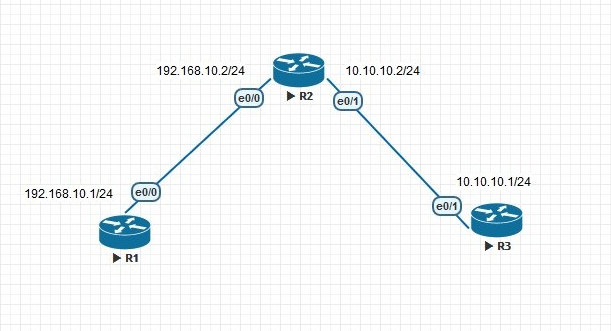
Let’s check the configurations
hostname R3
!
!
no ip routing
!
!
interface Ethernet0/1
ip address 10.10.10.1 255.255.255.0
no ip route-cache
hostname R1
!
!
no ip routing
!
!
interface Ethernet0/0
ip address 192.168.10.1 255.255.255.0
no ip route-cache
hostname R2
!
!
interface Ethernet0/0
ip address 192.168.10.2 255.255.255.0
!
interface Ethernet0/1
ip address 10.10.10.2 255.255.255.0
!
In R1 & R3 ip routing is disabled and no default gateway is there so let’s check the ARP cache of those devices.
R1#ping 10.10.10.1
Type escape sequence to abort.
Sending 5, 100-byte ICMP Echos to 10.10.10.1, timeout is 2 seconds:
.!!!!
Success rate is 80 percent (4/5), round-trip min/avg/max = 2/2/3 ms
R1#show arp
Protocol Address Age (min) Hardware Addr Type Interface
Internet 10.10.10.1 0 aabb.cc00.2000 ARPA Ethernet0/0
Internet 192.168.10.1 – aabb.cc00.1000 ARPA Ethernet0/0
When I tried to ping to 10.10.10.1 from R1 then my ping got succeeded . But how ? Since there were no ip routing and default gateway then how come it got succeeded. Proxy ARP did the trick If we check the ARP table of R1 we could see that MAC address which is showing to 10.10.10.1 is nothing but MAC of e0/0 itself.
R2#show interfaces ethernet 0/0 | include bia
Hardware is AmdP2, address is aabb.cc00.2000 (bia aabb.cc00.2000)
If we disable proxy arp in R2 then ping will not successful. Let’s check that
R2(config)#int e0/0
R2(config-if)#no ip pro
R2(config-if)#no ip proxy-arp
R2(config-if)#int e0/1
R2(config-if)#no ip proxy-arp
R2(config-if)#
Now I am going to do the same thing again but don’t forget to clear ARP cache of all routers.
R1#clear arp-cache
R1#ping 10.10.10.1
Type escape sequence to abort.
Sending 5, 100-byte ICMP Echos to 10.10.10.1, timeout is 2 seconds:
…..
Success rate is 0 percent (0/5).
Now we are going to give gateway to R1 and R3 .
R1(config)#ip default-gateway 192.168.10.2
R3(config)#ip default-gateway 10.10.10.2
And now I am going to ping again , see the result
R1#ping 10.10.10.1
Type escape sequence to abort.
Sending 5, 100-byte ICMP Echos to 10.10.10.1, timeout is 2 seconds:
.!!!!
Success rate is 80 percent (4/5), round-trip min/avg/max = 2/2/3 ms
R1#sho
R1#show ip rou
R1#show ip route
Default gateway is 192.168.10.2
Host Gateway Last Use Total Uses Interface
ICMP redirect cache is empty
Besides Proxy ARP and Gateway there is an another way to set gateway , that is known as ICMP Router Discovery Protocol (IRDP) .
IRDP Configuration
I am going to remove proxy arp and gateway from respective routers.
R1(config)#no ip default-gateway
R3(config)#no ip default-gateway
R2(config-if)#int e0/0
R2(config-if)#no ip proxy-arp
R2(config-if)#int e0/1
R2(config-if)#no ip proxy-arp
Now enable IRDP on both downlinks
R2#show run interface e0/0
Building configuration…
Current configuration : 176 bytes
!
interface Ethernet0/0
ip address 192.168.10.2 255.255.255.0
no ip proxy-arp
ip irdp
ip irdp maxadvertinterval 60
ip irdp minadvertinterval 10
ip irdp holdtime 180
end
R2#show run interface e0/1
Building configuration…
Current configuration : 174 bytes
!
interface Ethernet0/1
ip address 10.10.10.2 255.255.255.0
no ip proxy-arp
ip irdp
ip irdp maxadvertinterval 60
ip irdp minadvertinterval 10
ip irdp holdtime 180
End
If we don’t change the timers then it will take some time to populate Gateway.
R2#show ip irdp
Ethernet0/0 has router discovery enabled
Advertisements will occur between every 10 and 60 seconds.
Advertisements are sent with broadcasts.
Advertisements are valid for 180 seconds.
Default preference will be 0.
Ethernet0/1 has router discovery enabled
Advertisements will occur between every 10 and 60 seconds.
Advertisements are sent with broadcasts.
Advertisements are valid for 180 seconds.
Default preference will be 0.
Ethernet0/2 has router discovery disabled
Ethernet0/3 has router discovery disabled
And we need to enable IRDP in R1 and R3
R1(config)#ip gdp irdp
R1(config)#do sho ip rou
Gateway Using Interval Priority Interface
192.168.10.2 IRDP 68 0 Ethernet0/0
Default gateway is 192.168.10.2
Host Gateway Last Use Total Uses Interface
ICMP redirect cache is empty
R3(config)#ip gdp irdp
R3(config)#do sho ip route
Gateway Using Interval Priority Interface
10.10.10.2 IRDP 90 0 Ethernet0/1
Default gateway is 10.10.10.2
Host Gateway Last Use Total Uses Interface
ICMP redirect cache is empty
Let’s check the connectivity
R1#ping 10.10.10.1
Type escape sequence to abort.
Sending 5, 100-byte ICMP Echos to 10.10.10.1, timeout is 2 seconds:
!!!!!
Success rate is 100 percent (5/5), round-trip min/avg/max = 2/2/3 ms
Yeah it’s working. 🙂 🙂

 The Lazy Networker
Leave a comment