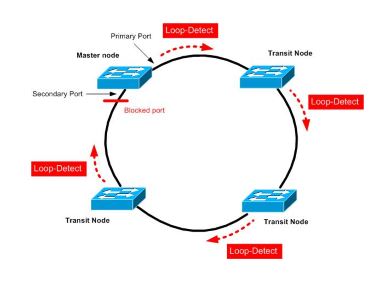
RRPP is a protocol designed for the HP switch as a ring architecture. This article only describes the setting of a single ring. The concept is to set a switch as the main node in the ring architecture, and the rest switches as transmitting nodes. Each switch A primary port and a secondary port will be set.
After the setting is completed, the primary node will periodically send a detection packet from the primary port. When the primary node receives the detected packet from the secondary port, it will determine that the ring architecture is normal and logically block the secondary port. Sends from the master port. When no detected packet is received (the ring is broken), the secondary port is enabled to transmit data.
–> The advantage is faster convergence than STP
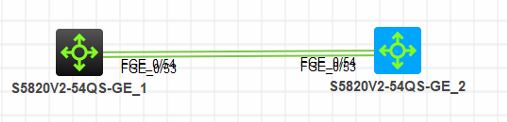
Lets see how to configure RRPP in hp switches
Master Mode Switch
1.Create rrpp domain
[S1]rrpp domain 1 (Create rrpp domain 1 and enter)
[S1-rrpp-domain1]control-vlan 4092 (Set the main control vlan to 4092 (4093 will be automatically generated as the sub-control vlan)
( it is not possible to use the default vlan as a control vlan)
2. Assign protection vlan to instance, and then assign instance to rrpp domain
[S1]stp region-configuration( Enter mstp settings)
[S1-mst-region]instance 0 vlan 1 (Add vlan1 to mstp)
[S1-mst-region]active region-configuration (Enable mstp domain)
[S1]rrpp domain 1 (enters rrpp domain 1)
[S1-rrpp-domain1]protected-vlan reference-instance 0 (Set vlan in mstp 0 to protect vlan)
3. Set rrpp port
Interface FGE1/0/53
link-delay 0
port link-type trunk
port trunk permit vlan all
undo stp enable
Interface FGE1/0/54
link-delay 0
port link-type trunk
port trunk permit vlan all
undo stp enable
4. Set the master node
[S1]rrpp domain 1
[S1-rrpp-domain1]ring 1 node-mode master primary-port FGE1/0/53 secondary-port FGE1/0/54 level 0
This switch is the master node,
5. Enable rrpp
[S1]rrpp enable Enable rrpp
[S1]rrpp domain 1
[S1-rrpp-domain1]ring 1 enable Enable rrpp ring1
Transmission Mode Switch
1.Create rrpp domain
[S2]rrpp domain 1 (Create rrpp domain 1 and enter)
[S2-rrpp-domain1]control-vlan 4092 (Set the main control vlan to 4092 (4093 will be automatically generated as the sub-control vlan)
( it is not possible to use the default vlan as a control vlan)
2. Assign protection vlan to instance, and then assign instance to rrpp domain
[S2]stp region-configuration( Enter mstp settings)
[S2-mst-region]instance 0 vlan 1 (Add vlan1 to mstp)
[S2-mst-region]active region-configuration (Enable mstp domain)
[S2]rrpp domain 1 (enters rrpp domain 1)
[S2-rrpp-domain1]protected-vlan reference-instance 0 (Set vlan in mstp 0 to protect vlan)
3. Set rrpp port
Interface FGE1/0/53
link-delay 0
port link-type trunk
port trunk permit vlan all
undo stp enable
Interface FGE1/0/54
link-delay 0
port link-type trunk
port trunk permit vlan all
undo stp enable
4.Set the transmission node
[S2]rrpp domain 1
[S2-rrpp-domain1]ring 1 node-mode transit primary-port FGE1/0/53 secondary-port FGE1/0/54 level 0
5. Enable rrpp
[S2]rrpp enable Enable rrpp
[S2]rrpp domain 1
[S2-rrpp-domain1]ring 1 enable Enable rrpp ring1
For verification
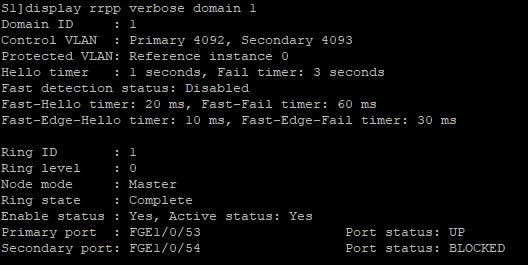
[S1]display rrpp verbose domain 1
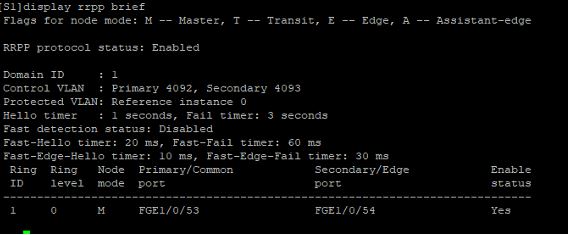
[S1]display rrpp brief
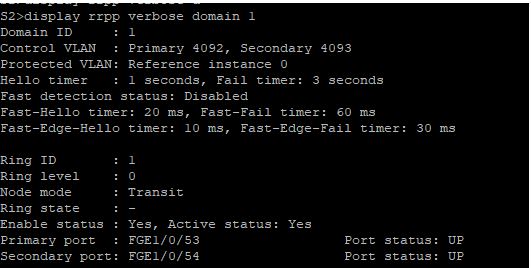
<S2>display rrpp verbose domain 1
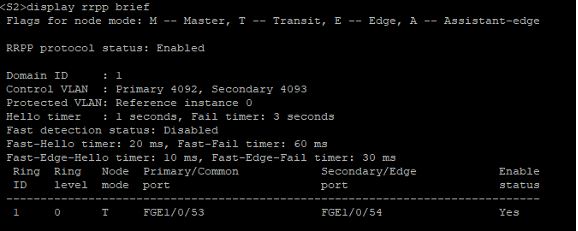
<S2>display rrpp brief

 The Lazy Networker
Leave a comment