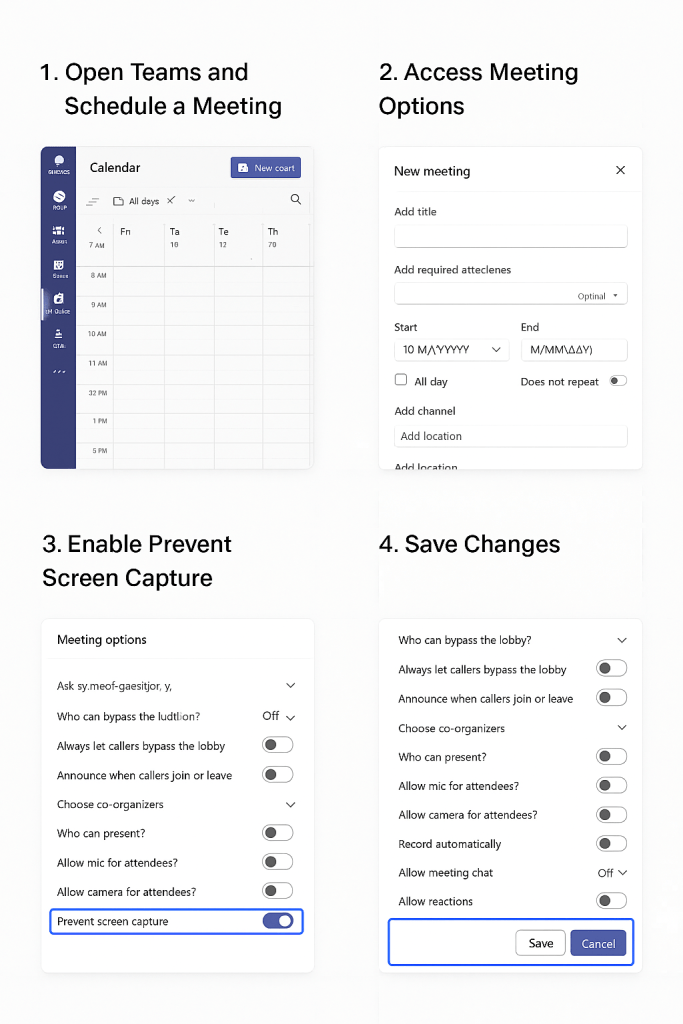
Microsoft is actively rolling out a new security feature in Teams called “Prevent screen Capture”. This will block screenshots and recordings in sensitive meetings. Any screenshot attempts will show a black rectangle over the screen and will not record anything . On Android devices, it will pop up a message that says “Screen capture is disabled.” On unsupported platforms, users will be forced to use audio-only modes.
This feature will be “off “ by default, and the user / organizer will have to manually enable it per meeting by selecting “meeting options.” However, to enforce “Prevent screen capture” effectively, the device should be enrolled in Intune, Microsoft’s cloud-based endpoint management solution. This is a premium feature and requires a Teams Premium license.
The Prevent Screen Capture feature in Teams protects sensitive or confidential information during virtual meetings. It benefits organizations in finance, healthcare, legal, and government by blocking screenshots and recordings. This feature helps protect intellectual property and client data, and supports regulatory compliance. It helps enforce strict security policies and Zero Trust frameworks by reducing insider threats and accidental leaks. For remote teams or those sharing proprietary information, this feature adds security and keeps critical information private.

 The Lazy Networker
Leave a comment