Here i am going to explain how to setup a small VoIP lab in latest packet tracer.
Network Topology
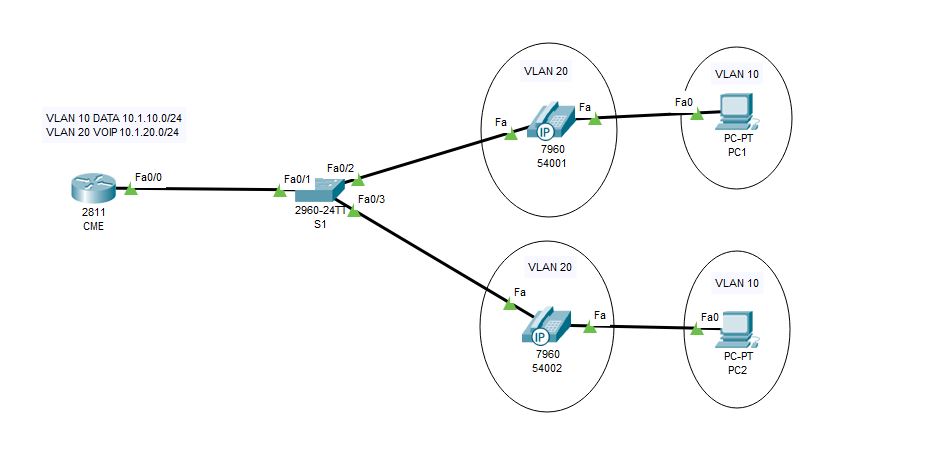
Configurations
1.DHCP & Interface configurations in C2811
!
hostname CME
!
ip dhcp pool DATA
network 10.1.10.0 255.255.255.0
default-router 10.1.10.254
ip dhcp pool VOIP
network 10.1.20.0 255.255.255.0
default-router 10.1.20.254
option 150 ip 10.1.20.254
!
interface FastEthernet0/0
no ip address
duplex auto
speed auto
!
interface FastEthernet0/0.10
encapsulation dot1Q 10
ip address 10.1.10.254 255.255.255.0
!
interface FastEthernet0/0.20
encapsulation dot1Q 20
ip address 10.1.20.254 255.255.255.0
!
end
2.CME Telephony configuration in C2811
CME(config)#telephony-service #telephony service
CME(config-telephony)#max-ephones 5 #maximum number of phones
CME(config-telephony)#max-dn 5 #maximum number of telephony numbers
CME(config-telephony)#ip source-address 10.1.20.254 port 2000 #source IP address
CME(config-telephony)#auto assign 4 to 6 #ext numbers to buttons
CME(config-telephony)#auto assign 1 to 5 #ext numbers to buttons
3.Phone directory for phones
CME(config)#ephone-dn 1 #directory entry
CME(config-ephone-dn)#number 54001 #phone number to this entry
!
CME(config)#ephone-dn 2 #directory entry
CME(config-ephone-dn)#number 54002 #phone number to this entry
4.Voice VLAN configuration
hostname S1
!
vlan 10
name DATA
vlan 20
name VOIP
!
interface FastEthernet0/1
switchport mode trunk
!
interface FastEthernet0/2
switchport access vlan 10
switchport mode access
switchport voice vlan 20
spanning-tree portfast
!
interface FastEthernet0/3
switchport access vlan 10
switchport mode access
switchport voice vlan 20
spanning-tree portfast
!
Verification
Try to call from one phone to another 🙂 🙂 If you have any doubt please reach out to me


 The Lazy Networker
Leave a reply to tontu Cancel reply