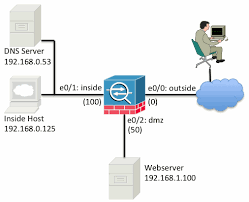
Packet tracer feature used to verify the security mechanisms as packet moves from one interface to another in a cisco ASA firewall. By this we can troubleshoot why the traffic is not working in the firewall or whether we created the rule correctly or not
A typical series of security features tested might look like the following:
- Flow lookup: Checks for existing xlate and conn entries.
- UN-NAT: Checks for address translation entries.
- Access list lookup: Checks for any applicable ACL entries.
- IP options lookup: Checks handling of IP options in the ingress packet.
- NAT: Checks the Reverse Path Forwarding (RPF) information.
- NAT: Checks for host connection limits.
- IP options lookup: Checks handling of IP options in egress packet.
- Flow creation: Creates new xlate and conn entries, if needed.
- Route lookup: Checks for a router to the destination address.
Using Packet Tracer
- Login to the ASA and go to enable mode:
- login as: admin
- dmin@10.1.10.1
- password: Type help or ‘?’ for a list of available commands.
- Corp-Hq-Fw01> en Password: Corp-Hq-Fw01#
- Gather the required information for your packet trace:
- The interface you wish the traffic to originate from
- The type of traffic you wish to spoof, with TCP, UDP, ICMP (all types) or RawIP traffic supported.
- The source port (if applicable) you want the traffic to originate from.
- The destination port (again, if applicable) you want the traffic to be destined to.
Now type in the command, syntax is
packet-tracer input $source-interface $traffic-type $src_address $src_proto $src_proto_options $dest_address
- In this instance let’s test
- Inside interface address
- ICMP traffic
- Destined for google 8s
Corp-Hq-Fw01# packet-tracer input inside icmp 10.1.10.5 8 0 8.8.8.8

Phase: 1
 Type: ROUTE-LOOKUP
 Subtype: Resolve Egress Interface
 Result: ALLOW
 Config:
 Additional Information:
 found next-hop X.X.X.X using egress ifc OUTSIDE

Phase: 2
 Type: ACCESS-LIST
 Subtype:
 Result: DROP
 Config:
 Implicit Rule
 Additional Information:

Result:
 input-interface: inside
 input-status: up
 input-line-status: up
 output-interface: OUTSIDE
 output-status: up
 output-line-status: up
 Action: drop
 Drop-reason: (acl-drop) Flow is denied by configured rule
The traffic is blocked in the firewall because there is no rule for created for ICMP. Lets do the test again after creating rule to allow ICMP in the firewall
Corp-Hq-Fw01# packet-tracer input inside icmp 10.1.10.5 8 0 8.8.8.8

Phase: 1
 Type: ROUTE-LOOKUP
 Subtype: Resolve Egress Interface
 Result: ALLOW
 Config:
 Additional Information:
 found next-hop X.X.X.X using egress ifc OUTSIDE

Phase: 2
 Type: NAT
 Subtype:
 Result: ALLOW
 Config:
 object network REDOUBT
 nat (inside,OUTSIDE) static X.X.X.X
 Additional Information:
 Static translate 10.1.10.0/0 to X.X.X.X/0

Phase: 3
 Type: NAT
 Subtype: per-session
 Result: ALLOW
 Config:
 Additional Information:

Phase: 4
 Type: IP-OPTIONS
 Subtype:
 Result: ALLOW
 Config:
 Additional Information:

Phase: 5
 Type: INSPECT
 Subtype: np-inspect
 Result: ALLOW
 Config:
 class-map inspection_default
 match default-inspection-traffic
 policy-map global_policy
 class inspection_default
 inspect icmp
 service-policy global_policy global
 Additional Information:

Phase: 6
 Type: INSPECT
 Subtype: np-inspect
 Result: ALLOW
 Config:
 Additional Information:

Phase: 7
 Type: NAT
 Subtype: rpf-check
 Result: ALLOW
 Config:
 nat (any,OUTSIDE) after-auto source dynamic any interface
 Additional Information:

Phase: 8
 Type: USER-STATISTICS
 Subtype: user-statistics
 Result: ALLOW
 Config:
 Additional Information:

Phase: 9
 Type: NAT
 Subtype: per-session
 Result: ALLOW
 Config:
 Additional Information:

Phase: 10
 Type: IP-OPTIONS
 Subtype:
 Result: ALLOW
 Config:
 Additional Information:

Phase: 11
 Type: USER-STATISTICS
 Subtype: user-statistics
 Result: ALLOW
 Config:
 Additional Information:

Phase: 12
 Type: FLOW-CREATION
 Subtype:
 Result: ALLOW
 Config:
 Additional Information:
 New flow created with id 725694429, packet dispatched to next module

Result:
 input-interface: inside
 input-status: up
 input-line-status: up
 output-interface: OUTSIDE
 output-status: up
 output-line-status: up
 Action: allow
As you can see above, ping passes through the firewall successfully
- You can see the initial routing decision(Phase 1),
- that the traffic hit the outside interface NAT (Phase 2 & 3)
- and that it passed ICMP inspection (Phase 5)

 The Lazy Networker
Leave a comment