🌐 What is OpenDaylight (ODL)?
OpenDaylight (ODL) is a modular, open-source Software-Defined Networking (SDN) controller developed under the Linux Foundation.
It acts as the central brain of a software-defined network.
Think of ODL as a network operating system that controls switches/routers from one place using programmable APIs.
🧠 What ODL Does
ODL sits centrally and communicates with network devices through southbound protocols like:
- NETCONF
- OpenFlow
- BGP-LS
- PCEP
- RESTCONF
- gNMI
Using these, ODL can:
- Read device configuration
- Push new configuration
- Collect topology information
- Automate network behavior
- Build SDN applications on top
⭐ Why ODL Is Popular
- 100% open source
- Supports multi-vendor hardware (Cisco, Juniper, Arista, Nokia, etc.)
- Deep support for NETCONF/YANG (used in modern Cisco IOS-XE)
- Full automation capabilities (northbound REST APIs)
- Strong community and carrier-grade framework
Used by:
- Cisco (old Cisco OSC was based on ODL)
- Red Hat
- Brocade
- Ericsson
- AT&T
🏗️ ODL Architecture (Simple Explanation)
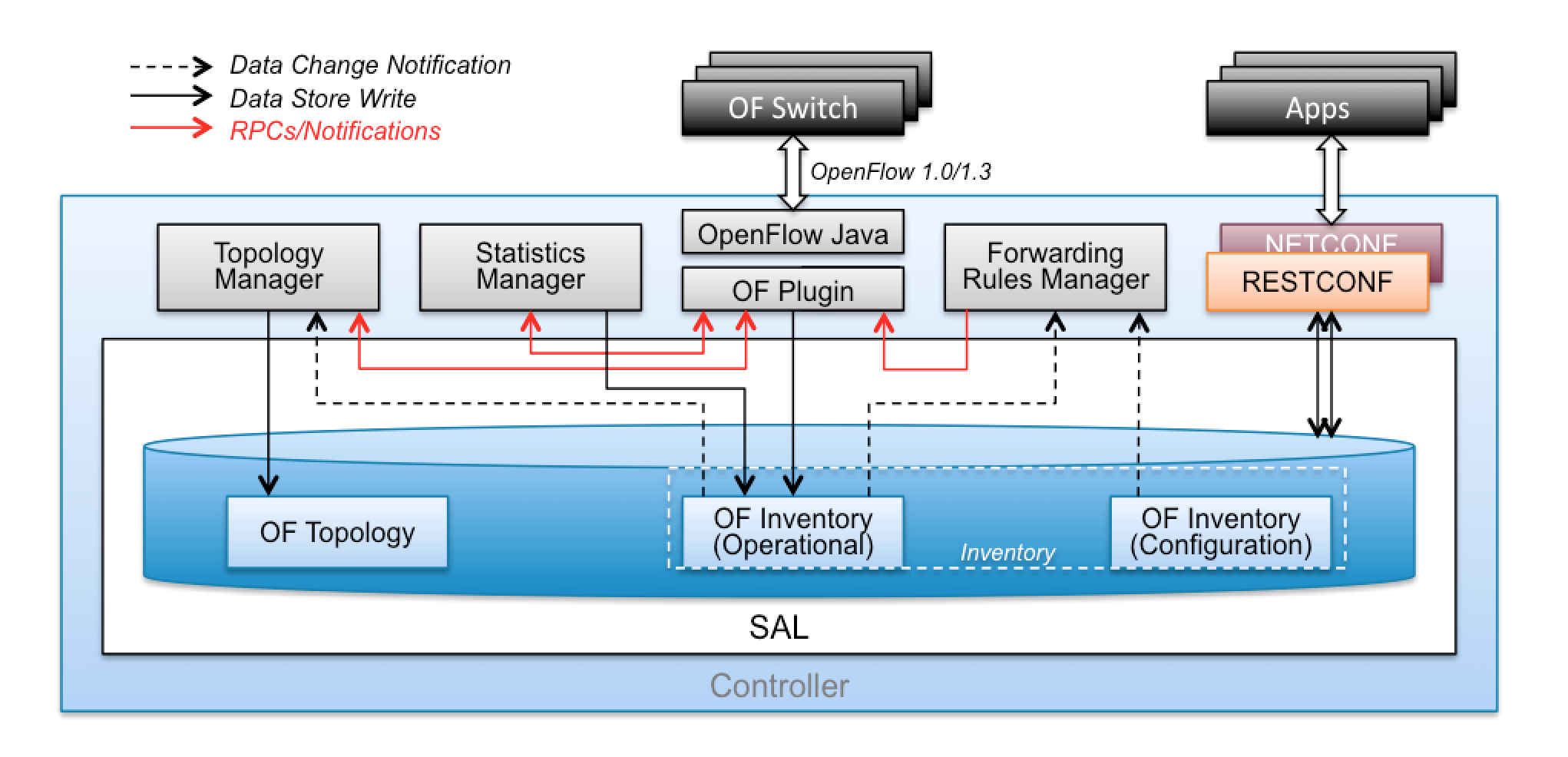

- Applications
Custom or prebuilt apps that run on top of ODL (traffic engineering, path computation, network monitoring). - Northbound APIs
RESTCONF/REST APIs used by automation tools (Python, Ansible, SDN apps). - Controller Platform (MD-SAL)
The Model-Driven Service Abstraction Layer.
This is the “brain” that stores models, state, topology, and configuration. - Southbound Plugins
Protocols used to talk to network devices:- OpenFlow
- NETCONF
- OVSDB
- BGP-LS
- PCEP
🔧 What You Can Do With ODL
✔ Build full SDN topologies
Example: OpenFlow-based switching labs.
✔ Automate Cisco devices using NETCONF/YANG
ODL can act like an automation engine:
- Push configs
- Track device state
- Collect data models
✔ Visualize network topology
ODL automatically discovers and displays network nodes and links.
✔ Traffic engineering (TE) and segment routing
Using BGP-LS and PCEP.
✔ Build your own SDN applications
Example:
- Auto-VLAN provisioning
- Auto-QoS
- Path optimization
- ACL automation
Here is the simplest and cleanest way to install OpenDaylight (ODL) on a Proxmox environment.
You can install ODL inside a VM (Ubuntu/Debian is recommended).
I’ll give you step-by-step commands, VM configuration, and post-installation access steps.
✅ 1. Create a VM on Proxmox
Use the following recommended specs:
Recommended VM Specs
- OS: Ubuntu Server 20.04 / 22.04 (ODL works best on 20.04)
- CPU: 2 vCPUs
- RAM: 4–6 GB
- Disk: 20–30 GB
- Network: 1 Ethernet interface (bridged or VLAN)
OpenDaylight is Java-heavy, so do not assign < 4 GB RAM.
🔧 2. Update the OS
SSH into the VM / Console:
sudo apt update && sudo apt upgrade -y
⚙️ 3. Install Java (ODL requires Java 11)
sudo apt install openjdk-11-jdk -y
Check version:
java -version
📦 4. Download OpenDaylight
Download the latest stable version (Phosphorus, Sodium, or Aluminium—any works).
cd /opt
sudo wget https://nexus.opendaylight.org/content/groups/public/org/opendaylight/integration/distribution-karaf/0.14.4/distribution-karaf-0.14.4.tar.gz
(Replace version if newer available.)
📁 5. Extract the ODL package
sudo tar -xvzf distribution-karaf-*.tar.gz
sudo mv distribution-karaf-* opendaylight
cd opendaylight
▶️ 6. Start OpenDaylight
Run ODL:
sudo ./bin/karaf
This launches the Karaf console (ODL CLI).
🧩 7. Install required ODL features
Inside the Karaf console, install main modules:
For OpenFlow:
feature:install odl-restconf odl-l2switch-switch odl-openflow-plugin-all
For NETCONF/YANG:
feature:install odl-restconf odl-netconf-all odl-mdsal-all
For BGP-LS / PCEP:
feature:install odl-bgpcep-bgp odl-bgpcep-pcep
🌐 8. Access Web UI (DLUX)
Enable DLUX:
feature:install odl-dlux-all
Open your browser:
http://<VM-IP>:8181/index.html#/login
Default credentials:
username: admin
password: admin
🔄 9. Run ODL as a service (recommended)
Exit Karaf (Ctrl + D)
Create a systemd service:
sudo nano /etc/systemd/system/opendaylight.service
Paste:
[Unit]
Description=OpenDaylight SDN Controller
After=network.target

[Service]
User=root
ExecStart=/opt/opendaylight/bin/karaf
Restart=on-abort

[Install]
WantedBy=multi-user.target
Enable + start:
sudo systemctl daemon-reload
sudo systemctl enable opendaylight
sudo systemctl start opendaylight
sudo systemctl status opendaylight
🎉 ODL is now running on Proxmox!
📌 Bonus: Integrate ODL with Cisco Devices
If using NETCONF:
feature:install odl-restconf odl-netconf-all
Then add your Cisco device:
PUT http://<ODL-IP>:8181/restconf/config/network-topology:network-topology/topology/topology-netconf/node/<device-name>
If using OpenFlow, make sure the switch points to ODL:
openflow controller x.x.x.x port 6633 vrf <name>

 The Lazy Networker
Leave a comment