-
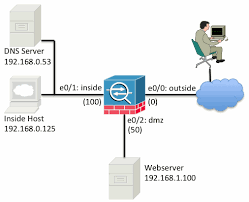 Continue reading →: How to use Packet Tracer on Cisco ASA
Packet tracer feature used to verify the security mechanisms as packet moves from one interface to another in a cisco ASA firewall. By this we can troubleshoot why the traffic is not working in the firewall or whether we created the rule correctly or not A typical series of security…
-
Continue reading →: Python Script to Configure Multiple Cisco Devices
This script to configure multiple cisco devices , we need to put all IP addresses in the IPAdrresslist.txt file and change cmd1 and cmd2 of the script with required config commands from future import print_functionfrom netmiko import ConnectHandler import sysimport timeimport selectimport paramikoimport replatform = ‘cisco_ios’username = ‘XXXX’password = ‘XXXX’…
-
Continue reading →: Python Script to Execute Show Commands in Multiple Devices and Save the Output to a Text File
The script requires two text files, put your device IP addresses in IPAddressList.txt and create another blank file named Command_Output.txt in the application directory . Prerequisites Python 3 Paramiko from future import print_functionfrom netmiko import ConnectHandlerimport osimport sysimport timeimport selectimport paramikoimport re fd = open(‘r’\home\user\Command_Output.txt’,’w’)old_stdout = sys.stdoutsys.stdout = fdplatform =…
-
Continue reading →: Introduction To Cisco ASA Firewall
Introduction In computer networking, Cisco ASA 5500 Series Adaptive Security Appliances, or simply Cisco ASA, is Cisco’s line of network security devices introduced in May 2005, that succeeded three existing lines of popular Cisco products: Cisco PIX, which provided firewall and network address translation (NAT) functions ended sale on 28…
-
Continue reading →: Introduction to Firewall
WHAT IS FIREWALL A firewall is a network security device, either hardware or software-based, which monitors all incoming and outgoing traffic and based on a defined set of security rules it accepts, rejects or drops that specific traffic. Accept : allow the traffic Reject : block the traffic but reply…
-
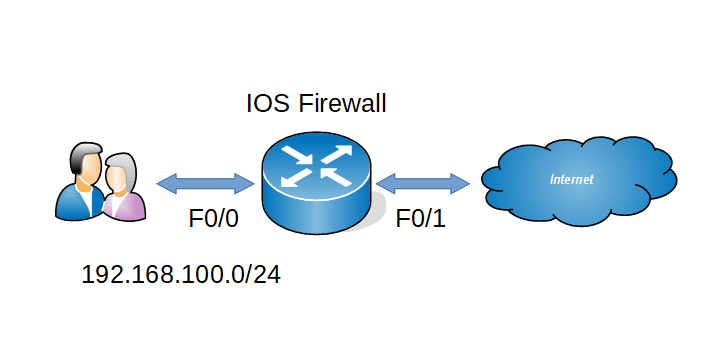 Continue reading →: How to configure CBAC in Cisco router
Context Based Access Control (CBAC) is an IOS firewall feature set similar like RACL, RACL is basically inspect L2- L4 layers only but CBAC has the capability of inspecting application layer traffic. Now we can see the configurations Step 1 : Create one ACL to deny all incoming traffic from…
-
Continue reading →: How To Configure Reflexive ACL in Cisco Router .
RACL is a type of ACL which will permit only the external traffic which is originated from inside and it will block all other external traffic . RACL will keep the session table of the outgoing traffic and it will check the external traffic with that particular session table .…
-
Continue reading →: Basic VoIP Configuration in Cisco Packet Tracer 7.2
Here i am going to explain how to setup a small VoIP lab in latest packet tracer. Network Topology Configurations 1.DHCP & Interface configurations in C2811 ! hostname CME ! ip dhcp pool DATA network 10.1.10.0 255.255.255.0 default-router 10.1.10.254 ip dhcp pool VOIP network 10.1.20.0 255.255.255.0 default-router 10.1.20.254 option 150…
-
Continue reading →: Simple Batch Script for Changing Proxy Options
When we take our office laptop to home the main headache is changing the proxy settings to access internet. Download the zip file unzip it into a folder there are two files, one for Turnoff Proxy another for Turn on Proxy. Download Link —-> Proxy Enjoy 🙂 🙂
-
Continue reading →: Simple Batch Script for Ping Sweep
This is a tiny batch script to check live hosts in network . Download the zip file and unzip contents to a folder and put your device names in servers.txt file. After that Run the script file it will do ping test and save the output in results.txt file. Download …
Hello,
Hey there, fellow nerds and net-surfers!

Welcome to my corner of the internet where I talk about the holy trinity of tech: Networking, Linux, and Security — or as I like to call it, “Ctrl+Alt+Fix-It”. If you’re into packet sniffing (the legal kind), hardening Linux boxes, or figuring out why your network is being as moody as a teenager, you’re in the right place.
This blog is where I dump useful knowledge, random tech rants, and occasional troubleshooting victories so future me (and hopefully you) can benefit. Expect bash scripts, firewall rules, sarcastic comments, and the occasional meme — because what’s IT without a little command-line chaos and caffeine?
Whether you’re a curious beginner or a battle-hardened sysadmin, I hope you’ll find something here to learn, laugh at, or copy-paste in desperation.
Welcome aboard — and may your logs always be verbose.
Let’s connect
Join the fun!
Stay updated with our latest tutorials and ideas by joining our newsletter.
 The Lazy Networker