Author: renjithbs

  • Static Routing in Cisco Router

    Static1Routing is the process of selecting paths for networks. We can use either Static or Dynamic method for this, in static routing the administrator itself assigning paths for each unknown networks but in the case of dynamic protocols are building paths for those unknown networks. There are some advantages and disadvantages for those two methods, like in static routing administrator overhead is very high but CPU overhead is less and in the case of dynamic routing administrator overhead is less but CPU overhead is very high. For small infrastructure static routing is enough, and we are using static routes with dynamic protocols that i will explain later.

    Basic Configurations

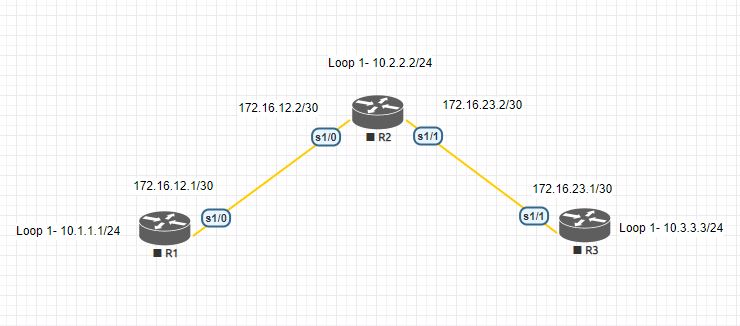
    Lets check the IP routing table of each devices.

    R1#

    Gateway of last resort is not set

    10.0.0.0/8 is variably subnetted, 2 subnets, 2 masks
    C 10.1.1.0/24 is directly connected, Loopback1
    L 10.1.1.1/32 is directly connected, Loopback1
    172.16.0.0/16 is variably subnetted, 2 subnets, 2 masks
    C 172.16.12.0/30 is directly connected, Serial1/0
    L 172.16.12.1/32 is directly connected, Serial1/0

    R2#

    Gateway of last resort is not set

    10.0.0.0/8 is variably subnetted, 2 subnets, 2 masks
    C 10.2.2.0/24 is directly connected, Loopback1
    L 10.2.2.2/32 is directly connected, Loopback1
    172.16.0.0/16 is variably subnetted, 4 subnets, 2 masks
    C 172.16.12.0/30 is directly connected, Serial1/0
    L 172.16.12.2/32 is directly connected, Serial1/0
    C 172.16.23.0/30 is directly connected, Serial1/1
    L 172.16.23.2/32 is directly connected, Serial1/1

    R3#

    Gateway of last resort is not set

    10.0.0.0/8 is variably subnetted, 2 subnets, 2 masks
    C 10.3.3.0/24 is directly connected, Loopback1
    L 10.3.3.3/32 is directly connected, Loopback1
    172.16.0.0/16 is variably subnetted, 2 subnets, 2 masks
    C 172.16.23.0/30 is directly connected, Serial1/1
    L 172.16.23.1/32 is directly connected, Serial1/1

    Static Routing Command Format

    R1(config)#ip route <Unknown Network> <Subnet Mask><Exit Interface or Next hop Address>

    For P2P links we can use exit interface but in the case of Multi-Access network it is advisable to use next-hop address other wise router has to resolve every destination address to its L2 address.

    So in R1 i am using both solutions

    R1(config)#ip route 10.2.2.0 255.255.255.0 172.16.12.2
    R1(config)#ip route 10.3.3.0 255.255.255.0 s1/0
    R1(config)#ip route 172.16.23.0 255.255.255.252 172.16.12.2

    Lets check the Routing table of R1
    10.0.0.0/8 is variably subnetted, 4 subnets, 2 masks
    C 10.1.1.0/24 is directly connected, Loopback1
    L 10.1.1.1/32 is directly connected, Loopback1
    S 10.2.2.0/24 [1/0] via 172.16.12.2
    S 10.3.3.0/24 is directly connected, Serial1/0
    172.16.0.0/16 is variably subnetted, 3 subnets, 2 masks
    C 172.16.12.0/30 is directly connected, Serial1/0
    L 172.16.12.1/32 is directly connected, Serial1/0
    S 172.16.23.0/30 [1/0] via 172.16.12.2

    The route which i have given Exit interface is taking as a connected route and rest of routes are using the Next hop as the exit path.



  • Why we need Proxy ARP ? Is there any replacement ?

    Proxy ARP is a mechanism which allows two subnets to communicate with each other without configuring Default Gateway.

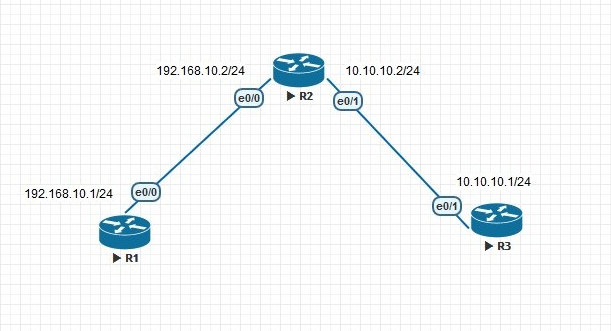
    I am going to explain it with a simple topology.

    IRDP


    Let’s check the configurations


    hostname R3

    !

    !

    no ip routing

    !

    !

    interface Ethernet0/1

    ip address 10.10.10.1 255.255.255.0

    no ip route-cache


    hostname R1

    !

    !

    no ip routing

    !

    !

    interface Ethernet0/0

    ip address 192.168.10.1 255.255.255.0

    no ip route-cache


    hostname R2

    !

    !

    interface Ethernet0/0

    ip address 192.168.10.2 255.255.255.0

    !

    interface Ethernet0/1

    ip address 10.10.10.2 255.255.255.0

    !


    In R1 & R3 ip routing is disabled and no default gateway is there so let’s check the ARP cache of those devices.


    R1#ping 10.10.10.1

    Type escape sequence to abort.

    Sending 5, 100-byte ICMP Echos to 10.10.10.1, timeout is 2 seconds:

    .!!!!

    Success rate is 80 percent (4/5), round-trip min/avg/max = 2/2/3 ms

    R1#show arp

    Protocol  Address          Age (min)  Hardware Addr   Type   Interface

    Internet  10.10.10.1              0   aabb.cc00.2000  ARPA   Ethernet0/0

    Internet  192.168.10.1            –   aabb.cc00.1000  ARPA   Ethernet0/0


    When I tried to ping to 10.10.10.1 from R1 then my ping got succeeded . But how ? Since there were no ip routing and default gateway  then how come it got succeeded. Proxy ARP did the trick If we check the ARP table of R1 we could see that MAC address which is showing to 10.10.10.1 is nothing but MAC of e0/0 itself.


    R2#show interfaces ethernet 0/0 | include bia

    Hardware is AmdP2, address is aabb.cc00.2000 (bia aabb.cc00.2000)


    If we disable proxy arp in R2 then ping will not successful. Let’s check that


    R2(config)#int e0/0

    R2(config-if)#no ip pro

    R2(config-if)#no ip proxy-arp

    R2(config-if)#int e0/1

    R2(config-if)#no ip proxy-arp

    R2(config-if)#


    Now I am going to do the same thing again but don’t forget to clear ARP cache of all routers.


    R1#clear arp-cache

    R1#ping 10.10.10.1

    Type escape sequence to abort.

    Sending 5, 100-byte ICMP Echos to 10.10.10.1, timeout is 2 seconds:

    …..

    Success rate is 0 percent (0/5).


    Now we are going to give gateway to R1 and R3 .


    R1(config)#ip default-gateway 192.168.10.2


    R3(config)#ip default-gateway 10.10.10.2


    And now I am going to ping again , see the result


    R1#ping 10.10.10.1

    Type escape sequence to abort.

    Sending 5, 100-byte ICMP Echos to 10.10.10.1, timeout is 2 seconds:

    .!!!!

    Success rate is 80 percent (4/5), round-trip min/avg/max = 2/2/3 ms

    R1#sho

    R1#show ip rou

    R1#show ip route

    Default gateway is 192.168.10.2


    Host               Gateway           Last Use    Total Uses  Interface

    ICMP redirect cache is empty


    Besides Proxy ARP and Gateway there is an another way to set gateway , that is known as ICMP Router Discovery Protocol (IRDP) .


    IRDP Configuration


    I am going to  remove proxy arp and gateway from respective routers.


    R1(config)#no ip default-gateway


    R3(config)#no ip default-gateway


    R2(config-if)#int e0/0

    R2(config-if)#no ip proxy-arp


    R2(config-if)#int e0/1

    R2(config-if)#no ip proxy-arp


    Now enable IRDP on both downlinks


    R2#show run interface e0/0

    Building configuration…


    Current configuration : 176 bytes

    !

    interface Ethernet0/0

    ip address 192.168.10.2 255.255.255.0

    no ip proxy-arp

    ip irdp

    ip irdp maxadvertinterval 60

    ip irdp minadvertinterval 10

    ip irdp holdtime 180

    end


    R2#show run interface e0/1

    Building configuration…


    Current configuration : 174 bytes

    !

    interface Ethernet0/1

    ip address 10.10.10.2 255.255.255.0

    no ip proxy-arp

    ip irdp

    ip irdp maxadvertinterval 60

    ip irdp minadvertinterval 10

    ip irdp holdtime 180

    End


    If we don’t change the timers then it will take some time to populate Gateway.


    R2#show ip irdp

    Ethernet0/0 has router discovery enabled


    Advertisements will occur between every 10 and 60 seconds.

    Advertisements are sent with broadcasts.

    Advertisements are valid for 180 seconds.

    Default preference will be 0.

    Ethernet0/1 has router discovery enabled

    Advertisements will occur between every 10 and 60 seconds.

    Advertisements are sent with broadcasts.

    Advertisements are valid for 180 seconds.

    Default preference will be 0.

    Ethernet0/2 has router discovery disabled

    Ethernet0/3 has router discovery disabled


    And we need to enable IRDP in R1 and R3


    R1(config)#ip gdp irdp

    R1(config)#do sho ip rou

    Gateway         Using  Interval  Priority   Interface

    192.168.10.2    IRDP       68         0     Ethernet0/0


    Default gateway is 192.168.10.2


    Host               Gateway           Last Use    Total Uses  Interface

    ICMP redirect cache is empty


    R3(config)#ip gdp irdp

    R3(config)#do sho ip route

    Gateway         Using  Interval  Priority   Interface

    10.10.10.2      IRDP       90         0     Ethernet0/1


    Default gateway is 10.10.10.2


    Host               Gateway           Last Use    Total Uses  Interface

    ICMP redirect cache is empty


    Let’s check the connectivity


    R1#ping 10.10.10.1

    Type escape sequence to abort.

    Sending 5, 100-byte ICMP Echos to 10.10.10.1, timeout is 2 seconds:

    !!!!!

    Success rate is 100 percent (5/5), round-trip min/avg/max = 2/2/3 ms


    Yeah it’s working. 🙂 🙂

  • Introduction to OSPF

    Introduction to OSPF

    The Open Shortest Path First (OSPF) is an Interior Gateway Protocol used to distribute routing information within a single Autonomous System.

    • It is open standard (RFC2328)
    • It is a Link-state protocol
    • Administrative Distance is 110
    • Uses cost as metric
    • Fast convergence
    • VLSM support
    • Scalable to large networks
    • Stub capabilities
    • Authentication (None, Clear-text, MD5)
    • Reliability (Sends only hello messages to maintain neighbour relationship)
    • Route tagging capabilities
    • Uses multicast for routing updates.

    Multicast address used by all                      224.0.0.5

    Multicast address used by DR/BDR          224.0.0.6


    Timer Intervals

    These are the values of the OSPF timers:

    • Hello—Interval time in seconds that a router sends an OSPF hello packet.
    • Dead—Time in seconds to wait before declaring a neighbour dead. By default, the dead timer interval is four times the hello timer interval.
    • Wait—Timer interval that causes the interface to exit out of the wait period and select a DR on the network. This timer is always equal to the dead timer interval.
    • Retransmit—Time to wait before retransmitting a database description (DBD) packet when it has not been acknowledged.

    Default Timers:

    On Broadcast and P2P links

    • Hello 10 seconds
    • Dead 40 seconds

    On NBMA links

    • Hello 30 seconds
    • Dead 120 seconds


  • EIGRP tables

    EIGRP tables

    • Neighbour table
    • Topology table (all possible paths to the destination)
    • Routing Table (Best path)
    • Advertised distance (distance between the local router and the next-hop router)
    • Feasible distance (sum of these ADs costs is referred to as the feasible distance (FD)
    • Successor (Installed in the routing table)
  • Introduction to EIGRP

    Introduction to EIGRP

    • EIGRP is a Cisco proprietary protocol.
    • It has two AD values (Internal – 90, External – 170 )
    • Fast Convergence.
    • Uses Dual (Diffusing update algorithm).
    • No periodic Updates only triggered updates.
    • Triggered updates only changes occurred.
    • Consumes less bandwidth.
    • Multiple network layer support (IPV4, IPV6).
    • Use of multicast (224.0.0.10) and unicast.
    • Variable-length subnet masking (VLSM) support.
    • Composite metric.
    • Unequal load balancing (improve use of traffic).
    • Protocols number is 88.
    • Summarization can be enable in any interface. (Reduce the size of the routing table).
    • Uses Hello packets to ensure the neighbour is still alive.
    • Reliable Transport Protocol (RTP) responsible for guarantee the EIGRP packets delivery to all neighbors.
  • RIP Timers

    RIP Timers

    Update: frequency of updates, default 30 seconds.

    Invalid: seconds since a valid update was seen, to consider the route invalid and placing the route into hold down, default is 180 seconds, in other words six updates. After 180 seconds the route is considered invalid – unreachable (metric is 16).

    Hold Down: Once in hold down, how long (in seconds) to “not believe” any equal or less impressive (worse) route updates for routes that are in hold down, default is 180 seconds.

    Flush: how many seconds, since the last valid update, until we throw that route in the trash (garbage collection for un-loved non-updated routes)

    Defaults are(in seconds), here is what ciscopress says:Update: 30 Invalid: 180 Hold Down: 180 Flush: 240

    The Invalid and Holddown Timers start together and have the same default value, what it means is, if a router does not receive any update for 180 seconds – it is considered invalid and during the same time (at least during the wait for an update) the holddown timers is also ticking and will not accept a worse update. The Flush Timers (after 180 seconds) will allow the better metric route to get entered during last 60 seconds and after waiting for 240 seconds since the last update, the route will be flushed from the route table.

  • Introduction to RIP

    Introduction to RIP

    Features of RIPv1
    It is a universal protocol.
    Administrative Distance is 120.
    Hop count is used as the metric for path selection.
    The maximum hop count is 15, so it supports maximum 16 routers per interface.
    Routing updates are broadcast every 30 seconds by default. Because it is a distance vector routing protocol, updates are sent even if no change has occurred.
    It uses Bellman ford algorithm for path selection.
    RIP can load balance over as many as 16 equal-cost paths (4 paths by default).
    It has no authentication support.

    It has two versions

    RIPv1 is a classful distance vector routing protocol described in RFC 1058 that does not send the subnet mask in its updates.Therefore, RIPv1 does not support VLSM or discontiguous subnets. RIPv1 automatically summarizes at the network boundary and cannot be configured not to.

    RIPv2 is a classless distance vector routing protocol defined in RFC 1721, RIP Version 2 Protocol Analysis; RFC 1722, RIP Version 2 Protocol Applicability Statement; and RFC 2453, RIP Version 2. The most significant addition to RIPv2 is the inclusion of the mask in the RIPv2 routing update packet, allowing RIPv2 to support VLSM and discontiguous subnets. RIPv2 automatically summarizes routes on classful network boundaries. As described earlier, however, you can disable this behavior. In addition, RIPv2 uses multicast addressing for more-efficient periodic updating on each interface. RIPv2 uses the 224.0.0.9 multicast address to advertise to other RIPv2 routers. This approach is more efficient than RIPv1’s approach. RIPv1 uses a 255.255.255.255 broadcast address, so all devices, including PCs and servers, must process the update packet. They perform the checksum on the Layer 2 packet and pass it up their IP stack. IP sends the packet to the User Datagram Protocol (UDP) process, and UDP checks to see whether RIP port 520 is available. Most PCs and servers do not have any process running on this port and discard the packet.