Author: renjithbs

  • 🧠 What is AI and ML in Networking?

    Artificial Intelligence (AI) and Machine Learning (ML) in networking refer to the use of data-driven algorithms and automation to make networks smarter, self-learning, and self-optimizing.

    In simple terms —
    👉 AI/ML help networks think, learn, and act on their own instead of relying only on human intervention.

    For example:

    • The network can detect anomalies, predict failures, or optimize routing automatically — based on continuous data analysis.

    ⚙️ Why AI/ML Are Needed in Networking

    Modern networks are:

    • Massive (thousands of devices, millions of connections)
    • Dynamic (cloud, IoT, 5G, SDN)
    • Complex (virtual + physical + security layers)

    Traditional manual management can’t keep up.
    AI and ML provide automation, intelligence, and adaptability to handle this complexity efficiently.


    🧩 Key Applications of AI/ML in Networking

    1. Network Automation

    • AI helps in automatically configuring, optimizing, and healing networks.
    • ML models learn from network data and predict optimal configurations.

    Example:
    Automatically adjusting QoS or bandwidth based on traffic patterns.


    2. Predictive Maintenance

    • ML algorithms analyze device logs, performance metrics, and temperature data to predict failures before they happen.

    Example:
    AI predicts a switch port failure based on rising CRC errors and triggers proactive replacement.


    3. Anomaly Detection and Security

    • AI detects unusual traffic patterns that may indicate cyberattacks, malware, or misconfigurations.
    • ML models can learn what “normal” behavior looks like and alert when deviations occur.

    Example:
    Detecting a DDoS attack based on sudden traffic spikes.


    4. Traffic Analysis and Optimization

    • ML helps to analyze traffic flows and dynamically reroute data for better performance.
    • Can optimize latency, throughput, and load balancing.

    Example:
    AI-driven SD-WAN controllers automatically select the best WAN link per application.


    5. Quality of Experience (QoE) Enhancement

    • AI monitors user experience (e.g., video call quality) and adjusts parameters like jitter, latency, and bandwidth in real time.

    6. Network Planning and Capacity Forecasting

    • ML models analyze growth trends and predict future capacity needs.
    • Useful for ISP and data center planning.

    7. Intent-Based Networking (IBN)

    • The network understands high-level intent (“ensure low latency for voice traffic”) and uses AI/ML to translate it into actual configurations and policies automatically.

    🧱 AI/ML in Networking Architecture

    LayerFunctionExample
    Data CollectionCollect telemetry, logs, SNMP, NetFlow, SyslogNetwork devices, sensors
    Data ProcessingClean, normalize, and store dataStreaming analytics platforms
    Machine Learning EngineTrain models, detect patterns, make predictionsTensorFlow, Scikit-learn
    Automation LayerTake actions (config updates, alerts, rerouting)Ansible, SDN controller
    Visualization LayerDisplay analytics and decisionsDashboards, reports

    🧠 AI Techniques Used in Networking

    TechniquePurposeExample
    Supervised LearningPredict outcomes from labeled dataPredict link failures
    Unsupervised LearningDetect patterns or anomaliesNetwork anomaly detection
    Reinforcement LearningLearn best actions via trial and feedbackAdaptive routing
    Deep Learning (Neural Networks)Handle large and complex dataVideo QoS optimization
    Natural Language Processing (NLP)Understand text/voice inputChatbots for network operations (NetOps assistants)

    🧰 Real-World AI-Driven Networking Tools

    VendorPlatformAI/ML Capability
    Cisco DNA CenterAI Network AnalyticsClient health, anomaly detection, insights
    Juniper Mist AIAI-driven WLANPredictive Wi-Fi troubleshooting
    Arista CloudVisionAI TelemetryNetwork state analysis
    VMware vRealize Network InsightNetwork analyticsFlow visibility and optimization
    Fortinet FortiAISecurity AIMalware detection and behavioral analysis

    🌐 Benefits of AI/ML in Networking

    • Self-Healing Networks: Automatically detect and fix issues
    • Proactive Maintenance: Prevent outages before they occur
    • Reduced Downtime: Faster troubleshooting and resolution
    • Better Security: Identify new attack patterns
    • Improved Performance: Optimize bandwidth and routing
    • Cost Efficiency: Reduce manual work and operational overhead

    🚧 Challenges

    • Data Quality: Inaccurate or incomplete data leads to wrong predictions
    • Integration: Legacy systems may not support modern APIs
    • Explainability: Hard to understand ML model decisions
    • Security: AI systems themselves must be protected

    🏗️ Example Use Case

    Scenario: Enterprise WAN Optimization

    1. Routers and switches send telemetry to a central AI engine.
    2. The ML model analyzes traffic latency, loss, and jitter.
    3. AI identifies congestion and predicts peak hours.
    4. The SDN controller reroutes traffic proactively to maintain SLA.

    Result → Better performance, fewer complaints, and automated control.


    🧭 Summary

    ConceptDescription
    AI in NetworkingSystems that make intelligent decisions automatically
    ML in NetworkingAlgorithms that learn patterns from network data
    Use CasesFault prediction, anomaly detection, optimization
    BenefitsAutomation, efficiency, reliability, cost reduction
    Key ToolsCisco DNA Center, Juniper Mist AI, VMware NSX, FortiAI
  • 🧠 What is a REST API?

    REST API stands for Representational State Transfer Application Programming Interface.
    It’s a standard way for two systems to communicate over the web (HTTP/HTTPS) — often between a client (like Python script or Ansible) and a server (like a network device or SDN controller).

    In simple terms:
    👉 A REST API allows you to interact with a system (get data, configure, update, or delete something) using HTTP requests — just like how your browser communicates with websites.


    ⚙️ Why REST APIs Matter in Networking

    In modern networks:

    • Devices (Cisco, Juniper, Fortinet, etc.) and controllers (like OpenDaylight, Cisco DNA Center, VMware NSX) expose REST APIs.
    • Engineers can automate tasks (like getting interface status, pushing configurations, or monitoring health) using API calls instead of manual CLI.

    Example:
    Instead of logging into 50 routers to check interface status,
    you can run one Python script that uses REST APIs to fetch all interface data.


    🧩 Key Concepts of REST API

    ConceptDescription
    ClientThe system or application making the API request (e.g., Python script, Postman, Ansible)
    ServerThe system that provides the API (e.g., router, firewall, controller)
    ResourceThe object you’re working with (e.g., interface, VLAN, route, policy)
    URI (Uniform Resource Identifier)The address to access a resource (e.g., /api/v1/interfaces)
    HTTP MethodsDefine what action to perform on a resource

    🔠 Common HTTP Methods

    MethodPurposeExample
    GETRetrieve informationGet interface status
    POSTCreate new data/configurationAdd a new VLAN
    PUTUpdate/replace dataChange an interface IP
    PATCHModify part of a resourceUpdate interface description
    DELETERemove data/configurationDelete a VLAN

    🧾 Typical REST API Request Structure

    A REST API request looks like this:

    Method: GET
    URL: https://192.168.1.1/api/v1/interfaces
    Headers:
        Content-Type: application/json
        Authorization: Bearer <token>


    Response (from device or server):

    {
      "interfaces": [
        {"name": "GigabitEthernet0/0", "status": "up"},
        {"name": "GigabitEthernet0/1", "status": "down"}
      ]
    }


    💡 Key Characteristics of REST APIs

    • Stateless: Each request is independent; the server doesn’t remember previous ones.
    • Uses HTTP verbs: GET, POST, PUT, DELETE, etc.
    • Uses URIs to identify resources.
    • Supports multiple data formats: Commonly JSON, sometimes XML.
    • Client-Server separation: Clear boundary between what requests and what responds.
    • Cacheable: Responses can be cached for performance.

    🧰 Common Tools to Work with REST APIs

    ToolUse
    PostmanGUI-based tool to test and visualize API calls
    cURLCommand-line tool for sending HTTP requests
    Python (Requests library)Programmatically interact with APIs
    Ansible / TerraformUse APIs for automation/infrastructure as code

    🐍 Example: Python Script Using REST API

    import requests
    import json
    
    url = "https://192.168.1.1/api/v1/interfaces"
    headers = {
        "Content-Type": "application/json",
        "Authorization": "Bearer your_token_here"
    }
    
    response = requests.get(url, headers=headers, verify=False)
    data = response.json()
    
    for interface in data["interfaces"]:
        print(interface["name"], "-", interface["status"])


    ✅ This script retrieves interface status from a network device that supports REST APIs.


    🌐 Example REST API Endpoints (Networking)

    VendorAPI ExampleDescription
    Cisco DNA Center/dna/intent/api/v1/network-deviceGet all devices
    Fortinet FortiGate/api/v2/monitor/system/interface/Get interface list
    Juniper Junos/rpc/get-interface-informationGet interface info
    OpenDaylight/restconf/operational/network-topology:network-topologyGet network topology
    Arista eAPI/command-apiSend CLI commands via JSON-RPC

    Benefits of Using REST APIs

    • Automation: Eliminate manual configuration
    • Integration: Connect network, cloud, and monitoring systems
    • Speed: Fast configuration and data collection
    • Consistency: Apply uniform settings across devices
    • Scalability: Manage hundreds of devices easily

    🧭 Summary

    ConceptDescription
    Full FormRepresentational State Transfer API
    PurposeCommunication between client and server using HTTP
    Data FormatJSON / XML
    Common MethodsGET, POST, PUT, DELETE
    Use in NetworkingAutomate configuration, monitoring, and integration
    ToolsPostman, Python Requests, Ansible
  • 🧠 What is Device Programmability?

    Device Programmability means the ability to configure, control, and manage network devices (like routers, switches, firewalls) using software or code, rather than logging in manually and typing CLI commands.

    In short —
    👉 It’s how network automation happens.

    Instead of an engineer configuring 100 devices manually, scripts or automation tools push configurations automatically using APIs or programmable interfaces.


    ⚙️ Traditional Networking vs Programmable Networking

    FeatureTraditional NetworkingDevice Programmability
    Configuration MethodManual CLI (per device)Automated using scripts/APIs
    SpeedSlow and error-proneFast and consistent
    ScalabilityDifficult for large networksEasily scales to hundreds/thousands of devices
    ControlDevice-specificCentralized and programmable
    AdaptabilityStaticDynamic (policy-driven and responsive)

    🧩 How Device Programmability Works

    Modern network devices support APIs or data models that allow software (like SDN controllers or automation tools) to communicate directly with them.

    Typical workflow:

    1. Automation script/tool (e.g., Python, Ansible) sends configuration commands.
    2. The device API/agent interprets and applies the change.
    3. The device returns a response/status (success/failure, interface info, etc.).
    4. Software can verify, rollback, or update further based on feedback.

    🧱 Key Building Blocks of Device Programmability

    1. APIs (Application Programming Interfaces)

    • Enable communication between applications and devices.
    • Most common: REST APIs, NETCONF, gRPC/gNMI, SNMP (legacy).

    2. Data Models

    • Define how device configuration/state is structured.
    • Common models: YANG, JSON, XML.

    3. Transport Protocols

    • Define how data is exchanged between systems.
    • Examples: HTTP/HTTPS, SSH, TLS, gRPC.

    4. Automation Tools

    • Tools/libraries to implement programmability:
      • Ansible (declarative, YAML-based)
      • Python scripts (with Paramiko, NAPALM, Netmiko)
      • Terraform (for infrastructure as code)
      • Cisco NSO / Juniper PyEZ / FortiManager APIs

    🔌 Common Device Programmability Interfaces

    ProtocolTypeDescription
    NETCONFXML-basedStandard IETF protocol for configuration management using YANG models
    RESTCONFHTTP-basedLightweight interface using REST and YANG
    gRPC/gNMIBinary protocolHigh-performance API for telemetry and configuration
    SNMPLegacyUsed for monitoring, not ideal for configuration
    CLI over SSHScript-basedBasic automation using Python (Netmiko, Paramiko)

    🧰 Example: Using Python for Device Programmability

    Here’s a simple Python example using Netmiko to configure a Cisco router:

    from netmiko import ConnectHandler
    
    device = {
        "device_type": "cisco_ios",
        "host": "192.168.1.1",
        "username": "admin",
        "password": "cisco123",
    }
    
    conn = ConnectHandler(**device)
    config_commands = [
        "interface GigabitEthernet0/1",
        "description Connected_to_Firewall",
        "ip address 10.1.1.1 255.255.255.0",
        "no shutdown"
    ]
    conn.send_config_set(config_commands)
    conn.save_config()
    conn.disconnect()


    ✅ This script logs into a router, configures an interface, and saves the configuration — automatically.


    🌐 Benefits of Device Programmability

    • Automation – Save time and reduce manual errors
    • Scalability – Manage thousands of devices centrally
    • Agility – Respond quickly to network changes or failures
    • Consistency – Enforce uniform policies and configs
    • Integration – Connect network with cloud, security, and monitoring systems

    🧩 Real-World Use Cases

    • Network configuration automation
    • Zero-touch provisioning (ZTP)
    • Telemetry and monitoring
    • Policy-based routing and QoS
    • Dynamic firewall or ACL updates
    • SDN integration and orchestration

    🏗️ Vendors Supporting Device Programmability

    • Cisco – NX-OS, IOS-XE, IOS-XR (NETCONF/RESTCONF/gNMI APIs)
    • Juniper – Junos with PyEZ, NETCONF, REST API
    • Arista – eAPI (JSON-RPC), gNMI
    • Fortinet – REST API, Ansible collections
    • VMware NSX, Palo Alto, Huawei, and others – all provide API-based programmability.

    🧭 Summary

    ConceptDescription
    DefinitionAbility to configure/manage devices via APIs or scripts
    GoalAutomate and simplify network operations
    ProtocolsNETCONF, RESTCONF, gNMI, SNMP
    Languages/ToolsPython, Ansible, Terraform
    BenefitsAutomation, consistency, scalability, agility
  • 🧠 What is OpenDaylight (ODL)?

    OpenDaylight (ODL) is an open-source Software-Defined Networking (SDN) controller platform developed under the Linux Foundation.
    It provides a modular and flexible platform that allows network administrators and developers to build, manage, and automate modern networks using open standards.

    In simple terms —
    👉 OpenDaylight acts as the “brain” of an SDN network, controlling how switches, routers, and other devices forward traffic.


    ⚙️ Why OpenDaylight?

    OpenDaylight was created to promote:

    • Network programmability (control via software instead of CLI)
    • Vendor interoperability (support for multi-vendor devices)
    • Open standards (no lock-in with a single vendor)
    • Rapid innovation (community-driven development)

    It supports various southbound and northbound APIs, making it adaptable to different types of networks (enterprise, data center, service provider).


    🧩 OpenDaylight Architecture Overview

    OpenDaylight follows the typical SDN 3-layer architecture:

    PlaneFunctionExample Components
    Application PlaneUser applications that define network policies, monitoring, automationCustom apps, analytics tools
    Control Plane (ODL Core)Makes decisions and manages network stateODL Controller, MD-SAL, Protocol plugins
    Data PlaneNetwork devices that forward packetsOpenFlow switches, routers, virtual switches (OVS)

    🧱 Key Components of OpenDaylight

    1. Model-Driven Service Abstraction Layer (MD-SAL)
      • The core framework of ODL.
      • Acts as a broker between applications and the network devices.
      • Enables modularity and plug-in integration.
    2. Southbound Interfaces (SBIs)
      • Used to communicate with network devices.
      • Supports multiple protocols like:
        • OpenFlow
        • NETCONF
        • BGP-LS
        • PCEP
        • SNMP
    3. Northbound Interfaces (NBIs)
      • Used by applications to communicate with the controller.
      • Typically REST APIs or YANG models.
    4. Network Services & Plugins
      • Include features such as topology management, path computation, device discovery, and statistics collection.
    5. Karaf Container
      • ODL runs inside the Apache Karaf OSGi container, which allows dynamic loading/unloading of components (bundles).

    🧰 Supported Protocols

    OpenDaylight supports many southbound protocols, including:

    • OpenFlow – For flow-based control
    • NETCONF/YANG – For configuration and device management
    • BGP-LS & PCEP – For routing and traffic engineering
    • OVSDB – For managing Open vSwitch instances

    🚀 Features and Capabilities

    • Centralized network management
    • Dynamic path computation and optimization
    • Multi-vendor interoperability
    • Network virtualization support
    • Extensible architecture (plug-in based)
    • Integration with NFV (Network Function Virtualization)

    💡 Use Cases

    • Data Center SDN – Automate provisioning and scaling of network resources.
    • WAN SDN – Implement centralized routing, TE (Traffic Engineering).
    • Network Virtualization – Integrate with OpenStack, OVS, and cloud platforms.
    • Service Provider Networks – Control and orchestrate large-scale multi-vendor networks.

    🏗️ Example Workflow

    1. Network device (e.g., OpenFlow switch) connects to OpenDaylight controller.
    2. Controller discovers the topology and collects network state.
    3. Network applications send instructions via REST APIs (e.g., create a flow path).
    4. ODL controller pushes flow rules to the switches.
    5. Traffic flows according to software-defined policies.

    🧩 Integration Ecosystem

    • OpenStack Neutron (for cloud SDN)
    • Mininet (for SDN simulation)
    • Open vSwitch (OVS) (for virtualization)
    • ONAP / ETSI MANO (for NFV orchestration)

    🌍 Summary

    FeatureDescription
    Project TypeOpen-source SDN controller
    Maintained byLinux Foundation
    Core FrameworkMD-SAL
    Container PlatformApache Karaf
    API SupportREST, YANG, OpenFlow, NETCONF
    GoalEnable programmable, vendor-neutral, and automated networks
  • 🧠 What is Software-Defined Networking (SDN)?

    Software-Defined Networking (SDN) is a modern approach to network design and management that separates the control plane from the data plane.
    This means the intelligence (decision-making) of the network is centralized in a software-based controller, while the hardware devices (switches/routers) just forward packets based on those instructions.


    ⚙️ Traditional Networking vs SDN

    FeatureTraditional NetworkingSoftware-Defined Networking
    Control PlaneDistributed across all devices (each switch/router runs its own control logic)Centralized in an SDN controller
    Data PlaneLocated on each deviceStill on devices but managed by controller
    ConfigurationManual (CLI per device)Automated (via controller and APIs)
    ScalabilityHarder to scaleEasily scalable and programmable
    FlexibilityStatic and hardware-dependentDynamic and software-driven

    🧩 Key Components of SDN

    1. Application Plane
      • Contains SDN applications (like network monitoring, security policies, load balancing).
      • Communicates with the controller through northbound APIs (often REST APIs).
    2. Control Plane
      • The SDN Controller (e.g., OpenDaylight, ONOS, Cisco APIC, VMware NSX Manager).
      • Makes centralized decisions on routing, access control, and network policies.
    3. Data Plane
      • Network devices (switches, routers) that forward packets based on rules received from the controller.
      • Communicates with the controller through southbound APIs (e.g., OpenFlow, NETCONF).

    🔄 How SDN Works (Simplified Flow)

    1. The controller maintains a complete view of the network.
    2. Applications request specific network behaviors (e.g., “prioritize VoIP traffic”).
    3. The controller translates these policies into forwarding rules.
    4. Switches/routers in the data plane execute those rules.

    🌐 Benefits of SDN

    • Centralized Management: Single point of control for the entire network.
    • Automation: Reduces manual configuration and human error.
    • Programmability: Network behavior can be modified via software or APIs.
    • Agility: Quickly adapt to new business or security needs.
    • Cost Efficiency: Can use commodity hardware instead of proprietary devices.

    🧱 Common SDN Protocols and Technologies

    • OpenFlow: The first and most popular southbound API for communication between controller and switches.
    • NETCONF/YANG: Used for configuration and monitoring.
    • VXLAN: Commonly used for SDN-based network virtualization.
    • REST APIs: For communication between applications and the controller.

    🏢 Popular SDN Implementations

    • Cisco ACI (Application Centric Infrastructure)
    • VMware NSX
    • OpenDaylight
    • ONOS (Open Network Operating System)
    • Juniper Contrail

    📈 Use Cases

    • Data Center Automation
    • Network Virtualization (SDN + NFV)
    • Dynamic Traffic Engineering
    • Cloud Networking
    • Security & Policy Enforcement
  • ✅Basic Cisco Switch Vlan and interface Configuration

    Basic VLAN and interface configuration on a Cisco switch involves creating VLANs, assigning ports, and managing trunk/access modes. The fundamental commands and workflow are outlined below.

    Create a VLAN

    To create VLANs (e.g., VLAN 10 and VLAN 20):

    Switch> enable
    Switch# configure terminal
    Switch(config)# vlan 10
    Switch(config-vlan)# exit
    Switch(config)# vlan 20
    Switch(config-vlan)# exit

    This creates VLANs 10 and 20 if they do not already exist.

    Assign Name to VLAN (Optional)

    To name a VLAN:

    Switch(config)# vlan 10
    Switch(config-vlan)# name Sales
    Switch(config-vlan)# exit

    Naming helps with identification, especially in large environments.

    Assign Switch Ports to VLAN

    To assign a port to VLAN 10:

    Switch(config)# interface fastethernet 0/1
    Switch(config-if)# switchport mode access
    Switch(config-if)# switchport access vlan 10
    Switch(config-if)# exit

    To assign another port to VLAN 20:

    Switch(config)# interface fastethernet 0/2
    Switch(config-if)# switchport mode access
    Switch(config-if)# switchport access vlan 20
    Switch(config-if)# exit

    Assigning ports assigns their traffic to the selected VLAN.

    Assign Multiple Ports (Interface Range)

    To assign several interfaces at once:

    Switch(config)# interface range fastethernet 0/3 - 0/8
    Switch(config-if-range)# switchport mode access
    Switch(config-if-range)# switchport access vlan 10
    Switch(config-if-range)# exit

    This saves time on large switches.

    Configure Trunk Ports

    For inter-switch links (carry multiple VLANs):

    Switch(config)# interface gigabitEthernet 0/1
    Switch(config-if)# switchport mode trunk
    Switch(config-if)# exit

    Trunk ports are required for connecting switches together and passing multiple VLANs.

    Common Show Commands

    • Check VLANs:
    Switch# show vlan
    • Check interface status:
    Switch# show interfaces status
    • Check port VLAN assignment:
    Switch# show running-config

    These commands help verify configuration and troubleshoot issues.

    This basic command set prepares a Cisco switch for segmented, secure communication in most enterprise or learning lab environments

  • ✅Basic Cisco Switch Configuration

    basic Cisco switch configuration involves initial setup tasks like setting the hostname, securing access, configuring management IP, and saving the configuration. Here are the main steps and key commands for a standard, unconfigured Cisco switch.

    Basic Configuration Steps

    Connect to the Switch

    • Connect via console cable using a terminal emulator (like PuTTY) with settings: 9600 baud, 8 data bits, no parity, 1 stop bit.

    Enter Privileged EXEC Mode

    Switch> enable
    • Moves from user mode to privileged (admin) mode.

    Enter Global Configuration Mode

    Switch# config t
    • Allows access to configuration commands.

    Set Hostname

    Switch(config)# hostname SWITCH_NAME
    • Changes the device’s name for identification.

    Set Management IP Address

    Switch(config)# interface vlan 1
    Switch(config-if)# ip address 192.168.1.2 255.255.255.0
    Switch(config-if)# no shutdown
    Switch(config-if)# exit
    Switch(config)# ip default-gateway 192.168.1.1
    • Assigns an IP for access via Telnet/SSH and sets the gateway for remote management.

    Set Console and Enable Passwords

    Switch(config)# line con 0
    Switch(config-line)# password YOUR_PASS
    Switch(config-line)# login
    Switch(config-line)# exit

    Switch(config)# enable secret ENABLE_PASS
    • Adds security for console and privileged access.

    Configure Banner Message (Optional)

    Switch(config)# banner motd #Unauthorized access prohibited#
    • Displays a warning on login.

    Save Configuration

    Switch# copy running-config startup-config
    • Writes the config to memory, so it persists after reboot.

    Key Points

    • Use the show run command to verify current configuration.
    • Always save your configuration after any change.
    • You can further configure VLANs, trunk/access ports, and add remote management (SSH/Telnet) as needed.
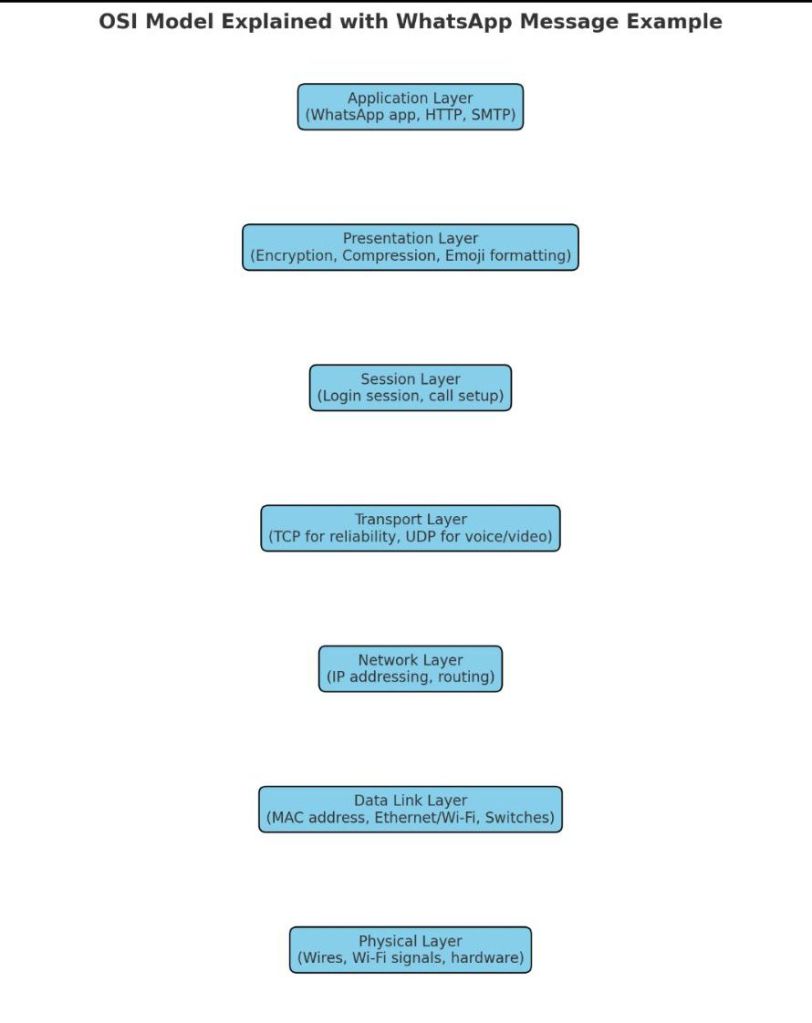
  • ✅ OSI Model with each layer explained using the example of sending a WhatsApp message 📩.

    Let’s walk through a real-world example:

    👉 You send a WhatsApp text message to your friend.


    📩 Step-by-Step Flow Through OSI Layers

    At Your Side (Sender)

    1. Application Layer (Layer 7)
      • You type “Hi!” in WhatsApp.
      • WhatsApp app uses HTTP/HTTPS + its own messaging protocols.
    2. Presentation Layer (Layer 6)
      • Message is encrypted (end-to-end encryption).
      • Emojis, fonts, and formats are standardized.
    3. Session Layer (Layer 5)
      • A secure session is established between your phone and WhatsApp servers.
      • Maintains your login session.
    4. Transport Layer (Layer 4)
      • WhatsApp decides TCP (for reliability) for text OR UDP (for voice/video).
      • Message is divided into segments, with sequence numbers.
    5. Network Layer (Layer 3)
      • Adds your IP address (source) and your friend’s IP (destination).
      • Routers decide the best path to the server or receiver.
    6. Data Link Layer (Layer 2)
      • Adds MAC addresses (your phone → Wi-Fi router → ISP device).
      • Creates frames for local delivery.
    7. Physical Layer (Layer 1)
      • Message is converted into electrical signals or Wi-Fi radio waves.
      • Sent over fiber/copper/wireless.

    Across the Network

    • The message travels through routers, switches, ISP networks, undersea cables, or satellites.
    • At each stop, layers 1–3 (Physical, Data Link, Network) ensure correct forwarding.

    At Your Friend’s Side (Receiver)

    • The process is reversed:
      • Signals → Frames → Packets → Segments → Sessions → Decryption → WhatsApp app shows “Hi!”

    In short:

    • Upper layers (7–5): Handle the meaning of your message.
    • Middle (4): Handles reliability.
    • Lower (3–1): Handle delivery.

  • ✅ OSI Reference Model

    The OSI Reference Model (Open Systems Interconnection Model) is a conceptual framework used to understand and describe how different networking protocols and systems communicate with each other.

    It breaks down the complex process of data communication into 7 distinct layers, each with specific functions.


    🔹 7 Layers of the OSI Model (Top to Bottom)

    7. Application Layer

    • What it does: Provides services directly to the user and applications.
    • Examples: Web browsers, email clients, file transfer, remote login.
    • Protocols: HTTP, HTTPS, FTP, SMTP, POP3, DNS.

    6. Presentation Layer

    • What it does: Ensures data is in a readable format for the application layer. Handles encryption, compression, translation.
    • Examples: Data formatting, SSL/TLS encryption, JPEG, GIF, MP3.

    5. Session Layer

    • What it does: Establishes, manages, and terminates sessions (connections) between applications.
    • Examples: Remote Procedure Calls (RPC), NetBIOS, managing login sessions.

    4. Transport Layer

    • What it does: Provides reliable or unreliable delivery of data between devices. Ensures proper sequencing and error checking.
    • Protocols:
      • TCP (Transmission Control Protocol – reliable, connection-oriented)
      • UDP (User Datagram Protocol – faster, connectionless)

    3. Network Layer

    • What it does: Handles logical addressing, routing, and path determination.
    • Examples: Routers operate here.
    • Protocols: IP (IPv4, IPv6), ICMP, OSPF, RIP, BGP.

    2. Data Link Layer

    • What it does: Provides node-to-node communication, error detection, and framing. Uses MAC addresses.
    • Examples: Switches, Ethernet, PPP, ARP.
    • Sub-layers:
      • LLC (Logical Link Control)
      • MAC (Media Access Control)

    1. Physical Layer

    • What it does: Deals with raw bits transmission over physical media (cables, wireless signals). Defines hardware specs.
    • Examples: Hubs, repeaters, cables, fiber optics, Wi-Fi signals.

    🔹 Easy Way to Remember (Mnemonic)

    All People Seem To Need Data Processing
    (Application, Presentation, Session, Transport, Network, Data Link, Physical)


    ✅ In summary:

    • Upper layers (7–5): Application-related
    • Middle (4): End-to-end communication (Transport)
    • Lower layers (3–1): Data delivery through network

  • ✅ What is an IP Address?

    An IP Address (Internet Protocol Address) is a unique logical address assigned to each device in a network so that it can be identified and communicate with other devices.

    👉 Think of it like the phone number of a device on a network.
    Without it, devices cannot send/receive data properly.


    ✅ Types of IP Addresses

    1. IPv4 (Internet Protocol version 4)
    2. IPv6 (Internet Protocol version 6) – newer, because IPv4 addresses are running out.

    ✅ IPv4 (Internet Protocol version 4)

    • Most widely used IP version today.
    • 32-bit address (4 bytes).
    • Written as 4 decimal numbers separated by dots.
    • Each number ranges from 0–255.
    • Example: 192.168.1.10 10.0.0.5 172.16.254.1

    🔹 IPv4 Address Classes

    IPv4 is divided into classes (for different network sizes):

    ClassRange (First Octet)ExampleUsage
    A1 – 12610.0.0.1Very large networks
    B128 – 191172.16.0.1Medium networks
    C192 – 223192.168.1.1Small networks
    D224 – 239224.0.0.1Multicast
    E240 – 255240.0.0.1Experimental

    ✅ Types of IPv4 Addresses

    1. Public IP – Unique, used on the internet.
    2. Private IP – Used inside local networks (not routable on internet).
      • Ranges:
        • 10.0.0.0 – 10.255.255.255
        • 172.16.0.0 – 172.31.255.255
        • 192.168.0.0 – 192.168.255.255
    3. Loopback Address127.0.0.1 → Used to test your own machine.

    ✅ Difference Between IPv4 & IPv6 (Quick View)

    FeatureIPv4IPv6
    Address Size32-bit128-bit
    Example192.168.1.12001:0db8:85a3::8a2e:0370:7334
    Total Addresses~4.3 billionAlmost unlimited
    UsageStill most commonGrowing adoption

    👉 In short:

    • IP Address = Unique logical address of a device.
    • IPv4 = 32-bit address, written in dotted decimal, still the most widely used.