Blog

  • Pass the Hash attack

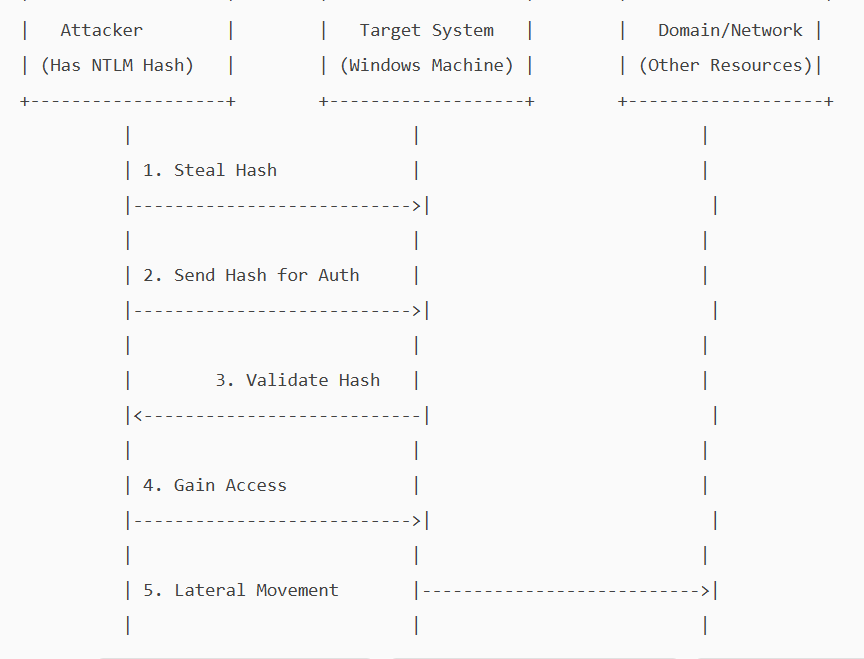
    A pass-the-hash attack is a cybersecurity attack in which a malicious user steals hashed credentials from a compromised system and uses them to log in as the original user.

    Hashing is an essential concept in cybersecurity and computer science. It involves using a mathematical algorithm, a hash function, to convert input data into a hash value. This process is deterministic and one-way, meaning it cannot be reversed to reveal the original data. i.e, It is not possible to get a clear-text password from a password hash.

    On local systems, Windows stores passwords in a hashed, encrypted format in the Security Accounts Manager (SAM) database and caches them in LSASS(Local Security Authority Subsystem Service) memory during logon. If a malicious user obtains a password hash, they can execute a pass-the-hash attack.

    NTLM (NT LAN Manager) is a Windows authentication protocol that uses a challenge-response mechanism. Instead of sending a password over the network, the client proves it knows the password by encrypting a server-issued challenge with the password’s hash (as a DES key)

    The server verifies this response using its stored hash.

    In a Pass-the-hash attack, the attacker exploits a vulnerability in the NTLM protocol to gain unauthorised access. The attacker does not need to know the clear-text password, as NTLM will accept the hash as proof of identity. He will pass the hash he obtained and will be allowed access as a legitimate user.

    . Attackers can steal these hashes through various methods

    1. Memory dumping: They can extract hashes from the LSASS process’s memory using Mimikatz and Procdump.\
    2. Stealing SAM database: If an attacker has access to SAM, they could dump the hash from it.
    3. Malware – key loggers, rootkits can give them access to hashes.
    4. Active directory compromise.
    5. Packet sniffing.

    NTLM is mainly kept for backward compatibility in Windows. Current versions of Windows primarily use Kerberos for domain authentication, but NTLM is still used where a system is not part of a domain.

    Because of its vulnerability, Microsoft recommends disabling NTLM wherever possible.

    Implementing a zero-trust architecture is the most effective way to prevent pass-the-hash attacks. Stick to the following to secure your Pc/network.

    1. Strong authentication and identity verification – implement MFA.
    2. Least privilege and Just-in-Time Access control.
    3. Continuous monitoring and anomaly detection
  • Prevent Screen Capture

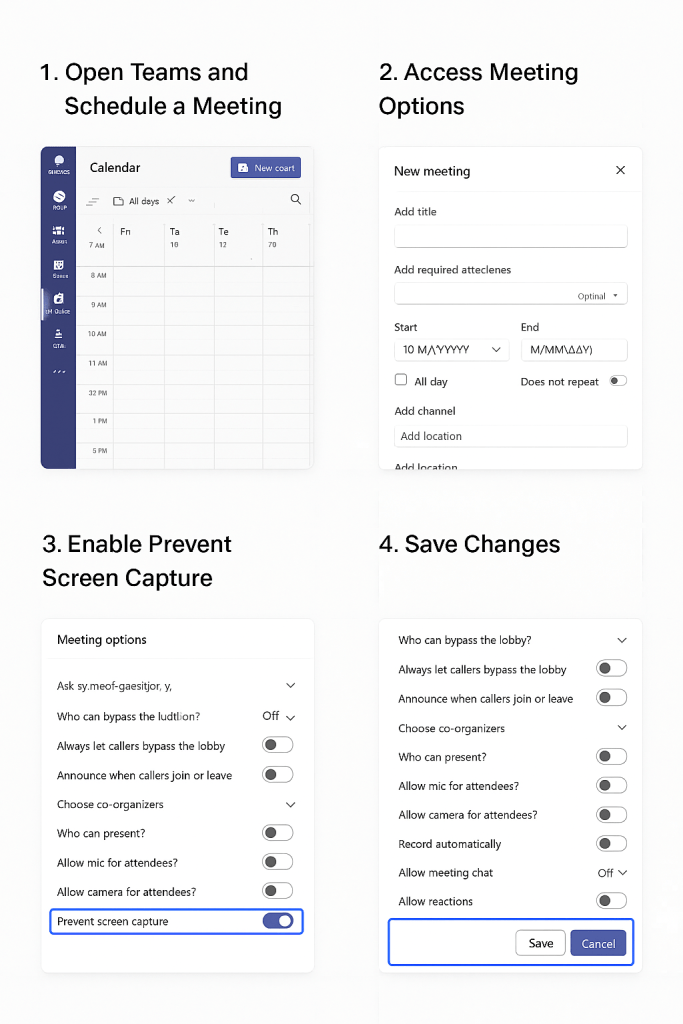
    Microsoft is actively rolling out a new security feature in Teams called β€œPrevent screen Capture”. This will block screenshots and recordings in sensitive meetings. Any screenshot attempts will show a black rectangle over the screen and will not record anything . On Android devices, it will pop up a message that says “Screen capture is disabled.” On unsupported platforms, users will be forced to use audio-only modes.

    This feature will be β€œoff β€œ by default, and the user / organizer will have to manually enable it per meeting by selecting β€œmeeting options.” However, to enforce β€œPrevent screen capture” effectively, the device should be enrolled in Intune, Microsoft’s cloud-based endpoint management solution.  This is a premium feature and requires a Teams Premium license.

    The Prevent Screen Capture feature in Teams protects sensitive or confidential information during virtual meetings. It benefits organizations in finance, healthcare, legal, and government by blocking screenshots and recordings. This feature helps protect intellectual property and client data, and supports regulatory compliance. It helps enforce strict security policies and Zero Trust frameworks by reducing insider threats and accidental leaks. For remote teams or those sharing proprietary information, this feature adds security and keeps critical information private.

  • Google updates Chrome β€” fixes around 20 vulnerabilities.

    The latest Chrome version, 142, released by Google on October 28th, includes patches to fix several documented vulnerabilities, some of which are high-severity. The update includes permission to block local network access from public/local websites. Chrome now blocks websites from sending requests to local network devices (like routers, printers, or software running on your machine) unless you explicitly grant permission. When a website tries to access your local network, it will ask you if it can “look for and connect to any device on your local network”. You can allow or deny. If you deny, the websites will not be able to connect to your local network.

    Why do websites need access to local networks?

    Smart home applications like Google Home require access to smart devices in your home, while streaming devices need to interact with smart TVs and speakers. Additionally, printing from websites necessitates communication with printers. However, granting access to your local network poses security risks, as malicious websites can potentially access, track, and exploit your devices.

    1. What is Local Network Access?

    Local Network Access (LNA) allows websites to communicate with devices on your home or office network (e.g., printers, smart TVs, routers). Chrome 142 now asks for permission before granting this access.

    2. Why Does Chrome Ask for Permission?
    • Security: Prevents malicious sites from probing your network or exploiting vulnerable devices.
    • Privacy: Stops websites from fingerprinting your network setup.
    3. When Should You Allow Access?

    Allow only if:

    • You trust the website (official vendor or service you use regularly).
    • You understand why it needs access, such as:
      • Smart home control (e.g., Philips Hue, Google Home).
      • Media streaming (e.g., Plex, Spotify Connect).
      • Enterprise tools (e.g., Box, Teams for printer integration).
      • Local development/testing (e.g., Selenium, TestCafe).
    4. When Should You Block Access?

    Block if:

    • The site is unknown or suspicious.
    • You are not using any local device integration.
    • The request seems unnecessary (e.g., a shopping site asking for local access).
    5. How to Manage Permissions
    • Check Current Settings:
    • Go to chrome://settings/content/localNetworkAccess.
    • Add Trusted Sites:
    • Under Allowed, add domains you trust.
    • Remove Sites:
    • Delete any site you do not recognise.
    6. Tips for Safe Usage
    • Always use HTTPS when granting access.
    • Avoid granting access on public Wi-Fi.
    • Review permissions periodically.

    To brief things , Chrome version 142, addresses over 20 security vulnerabilities, including 7 high-severity issues. Notably, Google awarded over $100,000 in bug bounties for two critical flaws in the V8 JavaScript engine.

    To stay protected and reduce the risk of exploitation:

    Update Chrome to the latest version immediately

    Restart your browser after updating.

  • The Silent Cost: Underutilization of Assets and Tools in Organizations

    In today’s cloud-first world, organizations spend millions on security, compliance, and infrastructure tools β€” yet most use less than 50% of their potential.
    This underutilization isn’t just wasted investment β€” it’s a missed opportunity to optimize, automate, and secure the digital ecosystem.

    🚨 The Reality of Tool Sprawl
    From CSPM, SPM, and Infrastructure Security to BUA , tech stacks are growing faster than adoption.

    Many enterprises:

    • Keep buying new tools instead of optimizing existing ones,
    • Overlook built-in features in Microsoft, AWS, or Azure,
    • Ignore capable open-source alternatives, and
    • Struggle with low tool adoption in operations due to lack of integration or enablement.

    The result? Expensive tools delivering minimal outcomes.


    πŸ” Hidden Potential Across Key Areas

    • CSPM: Used mainly for visibility, while automation, remediation, and multi-cloud correlation stay idle.
    • SPM: Focused on dashboards, rarely integrated with ITSM or DevOps to catch compliance drifts early.
    • Infrastructure Security: Tools like Tufin, Skybox, or Lacework offer strong analytics but are seldom linked to CI/CD or workflow automation.


    🧩 The Open-Source Gap
    Many organizations purchase costly solutions when powerful open-source options like Terrascan,Trivy, Terrascan, Falco, OSQuery, Rsyslog,Prometheus, or OpenVAS already exist.
    These tools offer:

    • Deep configurability,
    • Smooth CI/CD integration, and
    • Strong community support.

    Yet, they’re often ignored or only partially adopted β€” leaving huge value untapped.


    πŸ’‘ Shifting the Mindset

    Instead of expanding toolsets, focus on maximizing existing capabilities:

    • Conduct Tool Utilization Audits.
    • Evaluate open-source before buying new tools.
    • Train teams to use advanced features.
    • Automate posture insights within DevSecOps pipelines.

    The goal isn’t to have more tools β€” it’s to make existing ones work smarter together.


    βš™οΈ The Way Forward
    Before investing in another platform, ask:
    β€œAre we fully using what we already have β€” or paying twice for the same capability?”
    Optimizing assets and leveraging open-source innovation can reduce costs, improve visibility, and strengthen cloud security posture.
    In cybersecurity today, optimization is the new innovation β€” and efficiency is the new defense.


    πŸ’¬ What’s your view?
    Β Have you seen costly tools purchased while open-source alternatives sit idle? How can organizations empower operations teams to bridge this gap?


    #CloudSecurity #CSPM hashtag#SPM #InfraSecurity #DevSecOps #CloudGovernance #OpenSource #Freeware #ToolOptimization #SecurityPosture #Azure hashtag#AWS #CostOptimization #SecurityAutomation


    hashtag#CloudSecurity hashtag#CSPM hashtag#SPM hashtag#InfraSecurity hashtag#DevSecOps hashtag#CloudGovernance hashtag#OpenSource hashtag#Freeware hashtag#ToolOptimization hashtag#SecurityPosture hashtag#Azure hashtag#AWS hashtag#CostOptimization hashtag#SecurityAutomation

  • How Your PC Communicates with Google: Step-by-Step Network Journey

    When your PC communicates with Google’s server (e.g., http://www.google.com), there’s a sequence of events happening from your local network to Google’s global infrastructure.


    🧩 Step-by-Step Communication Flow

    1️⃣ You type β€œhttp://www.google.com” in your browser

    Your browser doesn’t know where Google is yetβ€”it only has a domain name.


    2️⃣ DNS Resolution (Finding the IP Address)

    • Your PC asks the DNS resolver (usually your ISP’s DNS or a public one like 8.8.8.8) to find the IP address of http://www.google.com.
    • The resolver checks:
      1. Local DNS cache (in your PC or router)
      2. If not found, it queries the root DNS servers
      3. Then .com TLD servers
      4. Finally Google’s authoritative DNS servers
    • You get back an IP address, e.g. 142.250.193.68

    πŸ”Έ Now your PC knows where to send packets β€” Google’s IP.


    3️⃣ ARP (Address Resolution Protocol)

    Before sending packets out, your PC needs to know the MAC address of the next hop (usually your router).

    • Your PC sends an ARP Request: β€œWho has the gateway IP (e.g., 192.168.1.1)?”
    • The router replies with its MAC address.
    • Now your PC can send the packet to the router.

    4️⃣ TCP Connection Establishment (3-Way Handshake)

    Your PC establishes a TCP connection with Google’s server (port 443 for HTTPS):

    1. SYN β†’ Client β†’ Server (request to start session)
    2. SYN-ACK ← Server β†’ Client (acknowledge and agree)
    3. ACK β†’ Client β†’ Server (final confirmation)

    βœ… Connection established.


    5️⃣ TLS/SSL Handshake (Secure Encryption)

    Since Google uses HTTPS, a TLS handshake occurs:

    • Browser and server agree on encryption methods.
    • Server sends its SSL certificate (issued by a trusted Certificate Authority).
    • Browser verifies authenticity.
    • A secure session key is generated.

    πŸ”’ Now communication is encrypted end-to-end.


    6️⃣ HTTP Request and Response

    • Browser sends:
      GET / HTTP/1.1
      Host: www.google.com
    • Google server processes it and responds with:
      HTTP/1.1 200 OK
      (plus HTML, CSS, JavaScript, etc.)

    The web page starts loading.


    7️⃣ Data Flow Path

    • Your data packet flows through multiple layers:
      1. PC β†’ Router (LAN)
      2. Router β†’ ISP (WAN)
      3. ISP β†’ Internet Backbone
      4. Internet β†’ Google Data Center

    Google uses CDNs (Content Delivery Networks) β€” your request is usually served from the nearest Google edge server, not necessarily the US.


    8️⃣ Response Rendered

    Your browser receives the HTML and starts rendering the Google homepage with logo, search box, etc.


    🌐 Simplified OSI Model Mapping

    OSI LayerExample in this process
    7 – ApplicationHTTP / HTTPS
    6 – PresentationSSL/TLS encryption
    5 – SessionTCP connection management
    4 – TransportTCP (Port 443)
    3 – NetworkIP addressing and routing
    2 – Data LinkEthernet / Wi-Fi (MAC addresses)
    1 – PhysicalCables, Wi-Fi signals, etc.
  • Cyber Attack Vectors: What You Need to Know –

    This morning, I received a text from AIB asking me to confirm a money transfer via a link. Panic set inβ€”until I remembered that I don’t even have an AIB account. Another day, another phishing attempt.

    Cybercriminals are increasingly targeting Irish individuals and businesses with sophisticated scams. These include:

    Phishing & Smishing

    Fake emails and texts often mimic trusted organisations, such as banks or An Post. Clicking links can lead to malware or credential theft. Watch for:

    • Poor grammar or odd phrasing
    • Suspicious sender addresses (e.g., support@aibbank-secure.com)
    • Urgent language pressuring quick action

    Vishing

    Scammers call pretending to be from banks or GardaΓ­, demanding sensitive info. Always hang up and call back using verified numbers.

    Spear Phishing

    Highly targeted attacks utilise personal details to craft convincing messagesβ€”such as fake invoices or job applications. Always verify unexpected requests through trusted channels.

    Social Media Scams

    Fake profiles and messages claim you’ve won a prize or violated copyright. These link to counterfeit login pages. If a friend sends an unusual request, confirm it directly with them.

    Credential Harvesting

    Scammers impersonate sites like Revenue.ie, luring victims with fake tax refund messages. These sites steal sensitive data, such as PPS numbers and bank details.

    Stay Safe with Zero Trust

    Adopt a “never trust, always verify” mindset. Don’t click links or share info without confirming through official channels. Cybercrime is risingβ€”64% of Irish adults have faced phishing attacks, nearly double the global average.

    Pause. Verify. Protect. Share this knowledge with friends, family, and colleagues. Awareness is your best defence.

  • 🧠 What is AI and ML in Networking?

    Artificial Intelligence (AI) and Machine Learning (ML) in networking refer to the use of data-driven algorithms and automation to make networks smarter, self-learning, and self-optimizing.

    In simple terms β€”
    πŸ‘‰ AI/ML help networks think, learn, and act on their own instead of relying only on human intervention.

    For example:

    • The network can detect anomalies, predict failures, or optimize routing automatically β€” based on continuous data analysis.

    βš™οΈ Why AI/ML Are Needed in Networking

    Modern networks are:

    • Massive (thousands of devices, millions of connections)
    • Dynamic (cloud, IoT, 5G, SDN)
    • Complex (virtual + physical + security layers)

    Traditional manual management can’t keep up.
    AI and ML provide automation, intelligence, and adaptability to handle this complexity efficiently.


    🧩 Key Applications of AI/ML in Networking

    1. Network Automation

    • AI helps in automatically configuring, optimizing, and healing networks.
    • ML models learn from network data and predict optimal configurations.

    Example:
    Automatically adjusting QoS or bandwidth based on traffic patterns.


    2. Predictive Maintenance

    • ML algorithms analyze device logs, performance metrics, and temperature data to predict failures before they happen.

    Example:
    AI predicts a switch port failure based on rising CRC errors and triggers proactive replacement.


    3. Anomaly Detection and Security

    • AI detects unusual traffic patterns that may indicate cyberattacks, malware, or misconfigurations.
    • ML models can learn what β€œnormal” behavior looks like and alert when deviations occur.

    Example:
    Detecting a DDoS attack based on sudden traffic spikes.


    4. Traffic Analysis and Optimization

    • ML helps to analyze traffic flows and dynamically reroute data for better performance.
    • Can optimize latency, throughput, and load balancing.

    Example:
    AI-driven SD-WAN controllers automatically select the best WAN link per application.


    5. Quality of Experience (QoE) Enhancement

    • AI monitors user experience (e.g., video call quality) and adjusts parameters like jitter, latency, and bandwidth in real time.

    6. Network Planning and Capacity Forecasting

    • ML models analyze growth trends and predict future capacity needs.
    • Useful for ISP and data center planning.

    7. Intent-Based Networking (IBN)

    • The network understands high-level intent (β€œensure low latency for voice traffic”) and uses AI/ML to translate it into actual configurations and policies automatically.

    🧱 AI/ML in Networking Architecture

    LayerFunctionExample
    Data CollectionCollect telemetry, logs, SNMP, NetFlow, SyslogNetwork devices, sensors
    Data ProcessingClean, normalize, and store dataStreaming analytics platforms
    Machine Learning EngineTrain models, detect patterns, make predictionsTensorFlow, Scikit-learn
    Automation LayerTake actions (config updates, alerts, rerouting)Ansible, SDN controller
    Visualization LayerDisplay analytics and decisionsDashboards, reports

    🧠 AI Techniques Used in Networking

    TechniquePurposeExample
    Supervised LearningPredict outcomes from labeled dataPredict link failures
    Unsupervised LearningDetect patterns or anomaliesNetwork anomaly detection
    Reinforcement LearningLearn best actions via trial and feedbackAdaptive routing
    Deep Learning (Neural Networks)Handle large and complex dataVideo QoS optimization
    Natural Language Processing (NLP)Understand text/voice inputChatbots for network operations (NetOps assistants)

    🧰 Real-World AI-Driven Networking Tools

    VendorPlatformAI/ML Capability
    Cisco DNA CenterAI Network AnalyticsClient health, anomaly detection, insights
    Juniper Mist AIAI-driven WLANPredictive Wi-Fi troubleshooting
    Arista CloudVisionAI TelemetryNetwork state analysis
    VMware vRealize Network InsightNetwork analyticsFlow visibility and optimization
    Fortinet FortiAISecurity AIMalware detection and behavioral analysis

    🌐 Benefits of AI/ML in Networking

    • Self-Healing Networks: Automatically detect and fix issues
    • Proactive Maintenance: Prevent outages before they occur
    • Reduced Downtime: Faster troubleshooting and resolution
    • Better Security: Identify new attack patterns
    • Improved Performance: Optimize bandwidth and routing
    • Cost Efficiency: Reduce manual work and operational overhead

    🚧 Challenges

    • Data Quality: Inaccurate or incomplete data leads to wrong predictions
    • Integration: Legacy systems may not support modern APIs
    • Explainability: Hard to understand ML model decisions
    • Security: AI systems themselves must be protected

    πŸ—οΈ Example Use Case

    Scenario: Enterprise WAN Optimization

    1. Routers and switches send telemetry to a central AI engine.
    2. The ML model analyzes traffic latency, loss, and jitter.
    3. AI identifies congestion and predicts peak hours.
    4. The SDN controller reroutes traffic proactively to maintain SLA.

    Result β†’ Better performance, fewer complaints, and automated control.


    🧭 Summary

    ConceptDescription
    AI in NetworkingSystems that make intelligent decisions automatically
    ML in NetworkingAlgorithms that learn patterns from network data
    Use CasesFault prediction, anomaly detection, optimization
    BenefitsAutomation, efficiency, reliability, cost reduction
    Key ToolsCisco DNA Center, Juniper Mist AI, VMware NSX, FortiAI
  • 🧠 What is a REST API?

    REST API stands for Representational State Transfer Application Programming Interface.
    It’s a standard way for two systems to communicate over the web (HTTP/HTTPS) β€” often between a client (like Python script or Ansible) and a server (like a network device or SDN controller).

    In simple terms:
    πŸ‘‰ A REST API allows you to interact with a system (get data, configure, update, or delete something) using HTTP requests β€” just like how your browser communicates with websites.


    βš™οΈ Why REST APIs Matter in Networking

    In modern networks:

    • Devices (Cisco, Juniper, Fortinet, etc.) and controllers (like OpenDaylight, Cisco DNA Center, VMware NSX) expose REST APIs.
    • Engineers can automate tasks (like getting interface status, pushing configurations, or monitoring health) using API calls instead of manual CLI.

    Example:
    Instead of logging into 50 routers to check interface status,
    you can run one Python script that uses REST APIs to fetch all interface data.


    🧩 Key Concepts of REST API

    ConceptDescription
    ClientThe system or application making the API request (e.g., Python script, Postman, Ansible)
    ServerThe system that provides the API (e.g., router, firewall, controller)
    ResourceThe object you’re working with (e.g., interface, VLAN, route, policy)
    URI (Uniform Resource Identifier)The address to access a resource (e.g., /api/v1/interfaces)
    HTTP MethodsDefine what action to perform on a resource

    πŸ”  Common HTTP Methods

    MethodPurposeExample
    GETRetrieve informationGet interface status
    POSTCreate new data/configurationAdd a new VLAN
    PUTUpdate/replace dataChange an interface IP
    PATCHModify part of a resourceUpdate interface description
    DELETERemove data/configurationDelete a VLAN

    🧾 Typical REST API Request Structure

    A REST API request looks like this:

    Method: GET
    URL: https://192.168.1.1/api/v1/interfaces
    Headers:
        Content-Type: application/json
        Authorization: Bearer <token>


    Response (from device or server):

    {
      "interfaces": [
        {"name": "GigabitEthernet0/0", "status": "up"},
        {"name": "GigabitEthernet0/1", "status": "down"}
      ]
    }


    πŸ’‘ Key Characteristics of REST APIs

    • Stateless: Each request is independent; the server doesn’t remember previous ones.
    • Uses HTTP verbs: GET, POST, PUT, DELETE, etc.
    • Uses URIs to identify resources.
    • Supports multiple data formats: Commonly JSON, sometimes XML.
    • Client-Server separation: Clear boundary between what requests and what responds.
    • Cacheable: Responses can be cached for performance.

    🧰 Common Tools to Work with REST APIs

    ToolUse
    PostmanGUI-based tool to test and visualize API calls
    cURLCommand-line tool for sending HTTP requests
    Python (Requests library)Programmatically interact with APIs
    Ansible / TerraformUse APIs for automation/infrastructure as code

    🐍 Example: Python Script Using REST API

    import requests
    import json
    
    url = "https://192.168.1.1/api/v1/interfaces"
    headers = {
        "Content-Type": "application/json",
        "Authorization": "Bearer your_token_here"
    }
    
    response = requests.get(url, headers=headers, verify=False)
    data = response.json()
    
    for interface in data["interfaces"]:
        print(interface["name"], "-", interface["status"])


    βœ… This script retrieves interface status from a network device that supports REST APIs.


    🌐 Example REST API Endpoints (Networking)

    VendorAPI ExampleDescription
    Cisco DNA Center/dna/intent/api/v1/network-deviceGet all devices
    Fortinet FortiGate/api/v2/monitor/system/interface/Get interface list
    Juniper Junos/rpc/get-interface-informationGet interface info
    OpenDaylight/restconf/operational/network-topology:network-topologyGet network topology
    Arista eAPI/command-apiSend CLI commands via JSON-RPC

    βœ… Benefits of Using REST APIs

    • Automation: Eliminate manual configuration
    • Integration: Connect network, cloud, and monitoring systems
    • Speed: Fast configuration and data collection
    • Consistency: Apply uniform settings across devices
    • Scalability: Manage hundreds of devices easily

    🧭 Summary

    ConceptDescription
    Full FormRepresentational State Transfer API
    PurposeCommunication between client and server using HTTP
    Data FormatJSON / XML
    Common MethodsGET, POST, PUT, DELETE
    Use in NetworkingAutomate configuration, monitoring, and integration
    ToolsPostman, Python Requests, Ansible
  • 🧠 What is Device Programmability?

    Device Programmability means the ability to configure, control, and manage network devices (like routers, switches, firewalls) using software or code, rather than logging in manually and typing CLI commands.

    In short β€”
    πŸ‘‰ It’s how network automation happens.

    Instead of an engineer configuring 100 devices manually, scripts or automation tools push configurations automatically using APIs or programmable interfaces.


    βš™οΈ Traditional Networking vs Programmable Networking

    FeatureTraditional NetworkingDevice Programmability
    Configuration MethodManual CLI (per device)Automated using scripts/APIs
    SpeedSlow and error-proneFast and consistent
    ScalabilityDifficult for large networksEasily scales to hundreds/thousands of devices
    ControlDevice-specificCentralized and programmable
    AdaptabilityStaticDynamic (policy-driven and responsive)

    🧩 How Device Programmability Works

    Modern network devices support APIs or data models that allow software (like SDN controllers or automation tools) to communicate directly with them.

    Typical workflow:

    1. Automation script/tool (e.g., Python, Ansible) sends configuration commands.
    2. The device API/agent interprets and applies the change.
    3. The device returns a response/status (success/failure, interface info, etc.).
    4. Software can verify, rollback, or update further based on feedback.

    🧱 Key Building Blocks of Device Programmability

    1. APIs (Application Programming Interfaces)

    • Enable communication between applications and devices.
    • Most common: REST APIs, NETCONF, gRPC/gNMI, SNMP (legacy).

    2. Data Models

    • Define how device configuration/state is structured.
    • Common models: YANG, JSON, XML.

    3. Transport Protocols

    • Define how data is exchanged between systems.
    • Examples: HTTP/HTTPS, SSH, TLS, gRPC.

    4. Automation Tools

    • Tools/libraries to implement programmability:
      • Ansible (declarative, YAML-based)
      • Python scripts (with Paramiko, NAPALM, Netmiko)
      • Terraform (for infrastructure as code)
      • Cisco NSO / Juniper PyEZ / FortiManager APIs

    πŸ”Œ Common Device Programmability Interfaces

    ProtocolTypeDescription
    NETCONFXML-basedStandard IETF protocol for configuration management using YANG models
    RESTCONFHTTP-basedLightweight interface using REST and YANG
    gRPC/gNMIBinary protocolHigh-performance API for telemetry and configuration
    SNMPLegacyUsed for monitoring, not ideal for configuration
    CLI over SSHScript-basedBasic automation using Python (Netmiko, Paramiko)

    🧰 Example: Using Python for Device Programmability

    Here’s a simple Python example using Netmiko to configure a Cisco router:

    from netmiko import ConnectHandler
    
    device = {
        "device_type": "cisco_ios",
        "host": "192.168.1.1",
        "username": "admin",
        "password": "cisco123",
    }
    
    conn = ConnectHandler(**device)
    config_commands = [
        "interface GigabitEthernet0/1",
        "description Connected_to_Firewall",
        "ip address 10.1.1.1 255.255.255.0",
        "no shutdown"
    ]
    conn.send_config_set(config_commands)
    conn.save_config()
    conn.disconnect()


    βœ… This script logs into a router, configures an interface, and saves the configuration β€” automatically.


    🌐 Benefits of Device Programmability

    • Automation – Save time and reduce manual errors
    • Scalability – Manage thousands of devices centrally
    • Agility – Respond quickly to network changes or failures
    • Consistency – Enforce uniform policies and configs
    • Integration – Connect network with cloud, security, and monitoring systems

    🧩 Real-World Use Cases

    • Network configuration automation
    • Zero-touch provisioning (ZTP)
    • Telemetry and monitoring
    • Policy-based routing and QoS
    • Dynamic firewall or ACL updates
    • SDN integration and orchestration

    πŸ—οΈ Vendors Supporting Device Programmability

    • Cisco – NX-OS, IOS-XE, IOS-XR (NETCONF/RESTCONF/gNMI APIs)
    • Juniper – Junos with PyEZ, NETCONF, REST API
    • Arista – eAPI (JSON-RPC), gNMI
    • Fortinet – REST API, Ansible collections
    • VMware NSX, Palo Alto, Huawei, and others – all provide API-based programmability.

    🧭 Summary

    ConceptDescription
    DefinitionAbility to configure/manage devices via APIs or scripts
    GoalAutomate and simplify network operations
    ProtocolsNETCONF, RESTCONF, gNMI, SNMP
    Languages/ToolsPython, Ansible, Terraform
    BenefitsAutomation, consistency, scalability, agility
  • 🧠 What is OpenDaylight (ODL)?

    OpenDaylight (ODL) is an open-source Software-Defined Networking (SDN) controller platform developed under the Linux Foundation.
    It provides a modular and flexible platform that allows network administrators and developers to build, manage, and automate modern networks using open standards.

    In simple terms β€”
    πŸ‘‰ OpenDaylight acts as the β€œbrain” of an SDN network, controlling how switches, routers, and other devices forward traffic.


    βš™οΈ Why OpenDaylight?

    OpenDaylight was created to promote:

    • Network programmability (control via software instead of CLI)
    • Vendor interoperability (support for multi-vendor devices)
    • Open standards (no lock-in with a single vendor)
    • Rapid innovation (community-driven development)

    It supports various southbound and northbound APIs, making it adaptable to different types of networks (enterprise, data center, service provider).


    🧩 OpenDaylight Architecture Overview

    OpenDaylight follows the typical SDN 3-layer architecture:

    PlaneFunctionExample Components
    Application PlaneUser applications that define network policies, monitoring, automationCustom apps, analytics tools
    Control Plane (ODL Core)Makes decisions and manages network stateODL Controller, MD-SAL, Protocol plugins
    Data PlaneNetwork devices that forward packetsOpenFlow switches, routers, virtual switches (OVS)

    🧱 Key Components of OpenDaylight

    1. Model-Driven Service Abstraction Layer (MD-SAL)
      • The core framework of ODL.
      • Acts as a broker between applications and the network devices.
      • Enables modularity and plug-in integration.
    2. Southbound Interfaces (SBIs)
      • Used to communicate with network devices.
      • Supports multiple protocols like:
        • OpenFlow
        • NETCONF
        • BGP-LS
        • PCEP
        • SNMP
    3. Northbound Interfaces (NBIs)
      • Used by applications to communicate with the controller.
      • Typically REST APIs or YANG models.
    4. Network Services & Plugins
      • Include features such as topology management, path computation, device discovery, and statistics collection.
    5. Karaf Container
      • ODL runs inside the Apache Karaf OSGi container, which allows dynamic loading/unloading of components (bundles).

    🧰 Supported Protocols

    OpenDaylight supports many southbound protocols, including:

    • OpenFlow – For flow-based control
    • NETCONF/YANG – For configuration and device management
    • BGP-LS & PCEP – For routing and traffic engineering
    • OVSDB – For managing Open vSwitch instances

    πŸš€ Features and Capabilities

    • Centralized network management
    • Dynamic path computation and optimization
    • Multi-vendor interoperability
    • Network virtualization support
    • Extensible architecture (plug-in based)
    • Integration with NFV (Network Function Virtualization)

    πŸ’‘ Use Cases

    • Data Center SDN – Automate provisioning and scaling of network resources.
    • WAN SDN – Implement centralized routing, TE (Traffic Engineering).
    • Network Virtualization – Integrate with OpenStack, OVS, and cloud platforms.
    • Service Provider Networks – Control and orchestrate large-scale multi-vendor networks.

    πŸ—οΈ Example Workflow

    1. Network device (e.g., OpenFlow switch) connects to OpenDaylight controller.
    2. Controller discovers the topology and collects network state.
    3. Network applications send instructions via REST APIs (e.g., create a flow path).
    4. ODL controller pushes flow rules to the switches.
    5. Traffic flows according to software-defined policies.

    🧩 Integration Ecosystem

    • OpenStack Neutron (for cloud SDN)
    • Mininet (for SDN simulation)
    • Open vSwitch (OVS) (for virtualization)
    • ONAP / ETSI MANO (for NFV orchestration)

    🌍 Summary

    FeatureDescription
    Project TypeOpen-source SDN controller
    Maintained byLinux Foundation
    Core FrameworkMD-SAL
    Container PlatformApache Karaf
    API SupportREST, YANG, OpenFlow, NETCONF
    GoalEnable programmable, vendor-neutral, and automated networks