⚙️ About HA in Meraki MX67
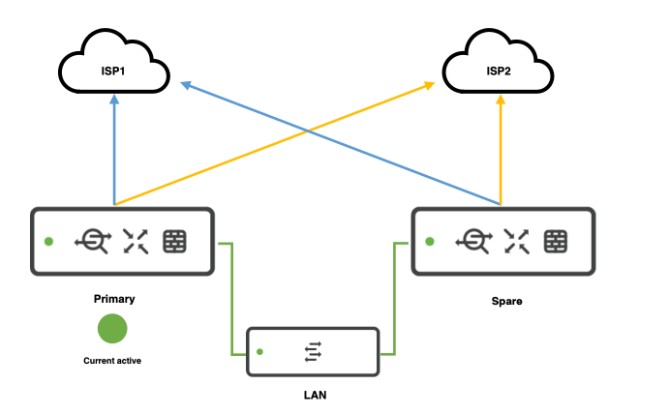
- Meraki MX67 supports Warm Spare / High Availability (HA) in Active–Passive mode.
- You need two MX67 appliances (same model) and Advanced Security license for each (or a single shared license if you have Meraki’s per-network licensing).
- The HA works by monitoring uplinks and LAN, and failing over automatically if the primary fails.
🛠 How to configure HA in Meraki MX67
✅ 1. Physical setup
- Place both MX67 units on the same LAN segment.
- Connect:
- Each MX to the Internet (same or different uplinks).
- The LAN ports of both MXs to the same switch or switches.
- Connect the dedicated HA/Spare port (Port 4 on MX67) from the primary to the secondary (this is the Heartbeat connection).
Tip: Make sure the heartbeat cable is direct or via switch but must be in the same VLAN/subnet.
✅ 2. Configure in Meraki Dashboard
- Go to:
Security & SD-WAN>Monitor>Appliance status - Add the secondary MX:
- Go to
Security & SD-WAN>Configure>Addressing & VLANs. - Enable Warm Spare.
- Go to
- Enter the serial number of the secondary MX in the Warm Spare field.
- Dashboard automatically creates:
- Shared Virtual IP (VIP) for WAN.
- Shared Virtual IP for LAN.
⚠ Both MXs must be in the same network in the Meraki Dashboard.
✅ 3. WAN configuration
- If you have multiple WAN uplinks, configure WAN1 and WAN2 on both MXs identically.
- Ensure the ISP allows the use of a Virtual IP (VIP).
✅ 4. LAN configuration
- LAN interfaces should be identical.
- Enable Use MX uplink IPs or configure Virtual IPs:
- WAN VIP: shared IP that moves between MXs.
- MX uplink IPs: individual IPs on each MX.
📊 Failover
- Heartbeat checks happen over the dedicated HA port.
- Failover typically occurs in seconds (about 30 seconds or less).
✅ Verify HA status
- In Dashboard:
Security & SD-WAN>Appliance status→ Warm Spare status shows which is active. - You can simulate failover by disconnecting the primary MX uplink.
🔒 Important notes:
- Meraki MX HA is Active-Passive; no Active-Active.
- Both MXs must be the same model and firmware.
- Heartbeat connection is essential for proper failover detection.
- Use Virtual IP for seamless failover.
 The Lazy Networker
Leave a comment