Author: renjithbs
-
Deleting a Stuck Deployment Notification in Cisco FMC
Its frustrating it can be when a Cisco Firepower Threat Defense (FTD) deployment gets stuck and keeps showing up in notifications. Let’s sort it out this issue:
-

25 Basic Linux Commands For Beginners
Basic Linux Terminal Commands S.No. Linux Commands Functions 1 Is Displays information about files in the current directory. 2 pwd Displays the current working directory. 3 mkdir Creates a directory. 4 cd To navigate between different folders. 5 rmdir Removes empty directories from the directory lists. 6 cp Moves files from one directory to another.
-
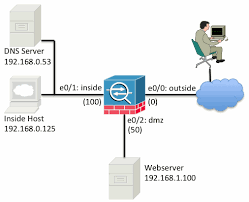
How to use Packet Tracer on Cisco ASA
Packet tracer feature used to verify the security mechanisms as packet moves from one interface to another in a cisco ASA firewall. By this we can troubleshoot why the traffic is not working in the firewall or whether we created the rule correctly or not A typical series of security features tested might look like
-
Python Script to Configure Multiple Cisco Devices
This script to configure multiple cisco devices , we need to put all IP addresses in the IPAdrresslist.txt file and change cmd1 and cmd2 of the script with required config commands from future import print_functionfrom netmiko import ConnectHandler import sysimport timeimport selectimport paramikoimport replatform = ‘cisco_ios’username = ‘XXXX’password = ‘XXXX’ ip_add_file = open(‘ips.txt’,’r’) for host
-
Python Script to Execute Show Commands in Multiple Devices and Save the Output to a Text File
The script requires two text files, put your device IP addresses in IPAddressList.txt and create another blank file named Command_Output.txt in the application directory . Prerequisites Python 3 Paramiko from future import print_functionfrom netmiko import ConnectHandlerimport osimport sysimport timeimport selectimport paramikoimport re fd = open(‘r’\home\user\Command_Output.txt’,’w’)old_stdout = sys.stdoutsys.stdout = fdplatform = ‘cisco_ios’username = ‘XXXX’password = ‘XXXX’ip_add_file
-
Introduction To Cisco ASA Firewall
Introduction In computer networking, Cisco ASA 5500 Series Adaptive Security Appliances, or simply Cisco ASA, is Cisco’s line of network security devices introduced in May 2005, that succeeded three existing lines of popular Cisco products: Cisco PIX, which provided firewall and network address translation (NAT) functions ended sale on 28 July 2008. Cisco IPS 4200
-
Introduction to Firewall
WHAT IS FIREWALL A firewall is a network security device, either hardware or software-based, which monitors all incoming and outgoing traffic and based on a defined set of security rules it accepts, rejects or drops that specific traffic. Accept : allow the traffic Reject : block the traffic but reply with an “unreachable error” Drop
-
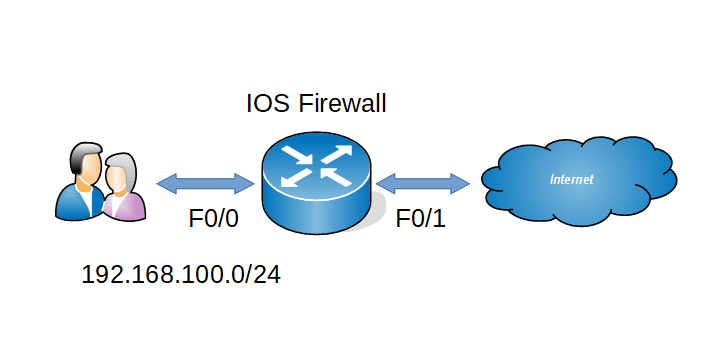
How to configure CBAC in Cisco router
Context Based Access Control (CBAC) is an IOS firewall feature set similar like RACL, RACL is basically inspect L2- L4 layers only but CBAC has the capability of inspecting application layer traffic. Now we can see the configurations Step 1 : Create one ACL to deny all incoming traffic from the internet Step 2 :
-
How To Configure Reflexive ACL in Cisco Router .
RACL is a type of ACL which will permit only the external traffic which is originated from inside and it will block all other external traffic . RACL will keep the session table of the outgoing traffic and it will check the external traffic with that particular session table . Find below for the configurations
-
Basic VoIP Configuration in Cisco Packet Tracer 7.2
Here i am going to explain how to setup a small VoIP lab in latest packet tracer. Network Topology Configurations 1.DHCP & Interface configurations in C2811 ! hostname CME ! ip dhcp pool DATA network 10.1.10.0 255.255.255.0 default-router 10.1.10.254 ip dhcp pool VOIP network 10.1.20.0 255.255.255.0 default-router 10.1.20.254 option 150 ip 10.1.20.254 ! interface FastEthernet0/0
 The Lazy Networker